mirror of
https://github.com/PowerShell/PowerShell
synced 2026-06-08 12:12:50 +00:00
 Travis Plunk
12911bbb40
Travis Plunk
12911bbb40
# Conflicts:
#	.vsts-ci/install-ps.yml
#	.vsts-ci/templates/install-ps-phase.yml
#	tools/install-powershell.ps1
#	tools/releaseBuild/azureDevOps/templates/windows-build.yml
Azure Dev Ops Release Builds
Requirements
Docker must be installed to run any of the release builds.
Running Windows Release Builds Locally
From PowerShell on Windows, run .\vstsbuild.ps1 -ReleaseTag <tag> -Name <buildName>.
For the package builds, run .\vstsbuild.ps1 -ReleaseTag <tag> -Name <buildName> -BuildPath <path to extracted zip from build step> -SignedFilesPath <path to extracted 'symbol' zip from build step>
Windows Build Names:
win7-x64-symbols- Builds the Windows x64 Zip with symbols
win7-x86-symbols- Builds the Windows x86 Zip with symbols
win7-arm-symbols- Builds the Windows ARM Zip with symbols
win7-arm64-symbols- Builds the Windows ARM64 Zip with symbols
win7-fxdependent-symbols- Builds the Windows FxDependent Zip with symbols
win7-x64-package- Builds the Windows x64 packages
win7-x86-package- Builds the Windows x86 packages
win7-arm-package- Builds the Windows ARM packages
win7-arm64-package- Builds the Windows ARM64 packages
win7-fxdependent-package- Builds the Windows FxDependent packages
Running Linux Release Builds Locally
From PowerShell on Linux or macOS, run .\vstsbuild.ps1 -ReleaseTag <tag> -Name <buildName>.
Linux Build Names:
deb- Builds the Debian Packages, ARM32 and ARM64.
alpine- Builds the Alpine Package
rpm- Builds the RedHat variant Package
Azure Dev Ops Build
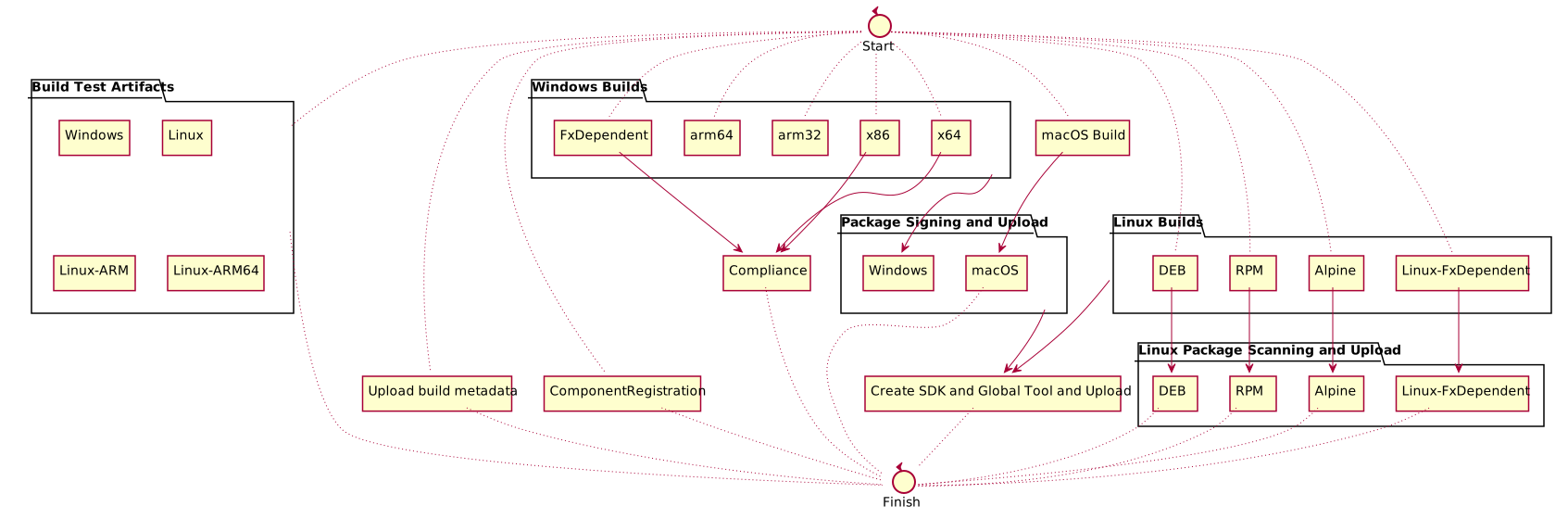
The release build is fairly complicated. The definition is at ./azureDevOps/releaseBuild.yml.
Here is a diagram of the build: