mirror of
https://github.com/PowerShell/PowerShell
synced 2026-06-08 12:12:50 +00:00
 Travis Plunk
5919a249a1
Travis Plunk
5919a249a1
* Fix code PATs

* Fix feed PATs

* remove gallery commit

* update feed url

* Update to new variable groups

* Fix Variable name

* Fix credential template

* Disable Signing setup in prep stage

* Capture nuget source list

* lock down the firewall

* Add creds to feed switch to allow single switch location

* Use switch from build.psm1

* Use switch template instead of commands

* update to test feed

* disable codeql in jobs where we don't compile

* disable code sign validation for prep

* move capture steps to restore phase to see if it speeds things up

* remove duplicate capture of nuget config

* update test service

* Only build windows test service on windows

* warn when no config is generated

* try to fix test service

* fix web listener refs

* try removing dotnet tool

* update feedname with user info

* update package version that is not found

* try moving failing jobs to restore phase

* allow nuget inset in either phase

* update package ref

* use the right reporoot

* Move everything to restore

* Try adding build phase

* put nuget files in the right place

* move bootstrap into yaml

* remove onebranch agent items from macos build

* switch to environment variable

* bump a couple of packages

* fix formatting

* Fix static analysis issue

* update feed url to test restoring everything

* install the AzFeed cred provider

* fix binlog issues
Azure Dev Ops Release Builds
Requirements
Docker must be installed to run any of the release builds.
Running Windows Release Builds Locally
From PowerShell on Windows, run .\vstsbuild.ps1 -ReleaseTag <tag> -Name <buildName>.
For the package builds, run .\vstsbuild.ps1 -ReleaseTag <tag> -Name <buildName> -BuildPath <path to extracted zip from build step> -SignedFilesPath <path to extracted 'symbol' zip from build step>
Windows Build Names:
win7-x64-symbols- Builds the Windows x64 Zip with symbols
win7-x86-symbols- Builds the Windows x86 Zip with symbols
win7-arm-symbols- Builds the Windows ARM Zip with symbols
win7-arm64-symbols- Builds the Windows ARM64 Zip with symbols
win7-fxdependent-symbols- Builds the Windows FxDependent Zip with symbols
win7-x64-package- Builds the Windows x64 packages
win7-x86-package- Builds the Windows x86 packages
win7-arm-package- Builds the Windows ARM packages
win7-arm64-package- Builds the Windows ARM64 packages
win7-fxdependent-package- Builds the Windows FxDependent packages
Running Linux Release Builds Locally
From PowerShell on Linux or macOS, run .\vstsbuild.ps1 -ReleaseTag <tag> -Name <buildName>.
Linux Build Names:
deb- Builds the Debian Packages, ARM32 and ARM64.
alpine- Builds the Alpine Package
rpm- Builds the RedHat variant Package
Azure Dev Ops Build
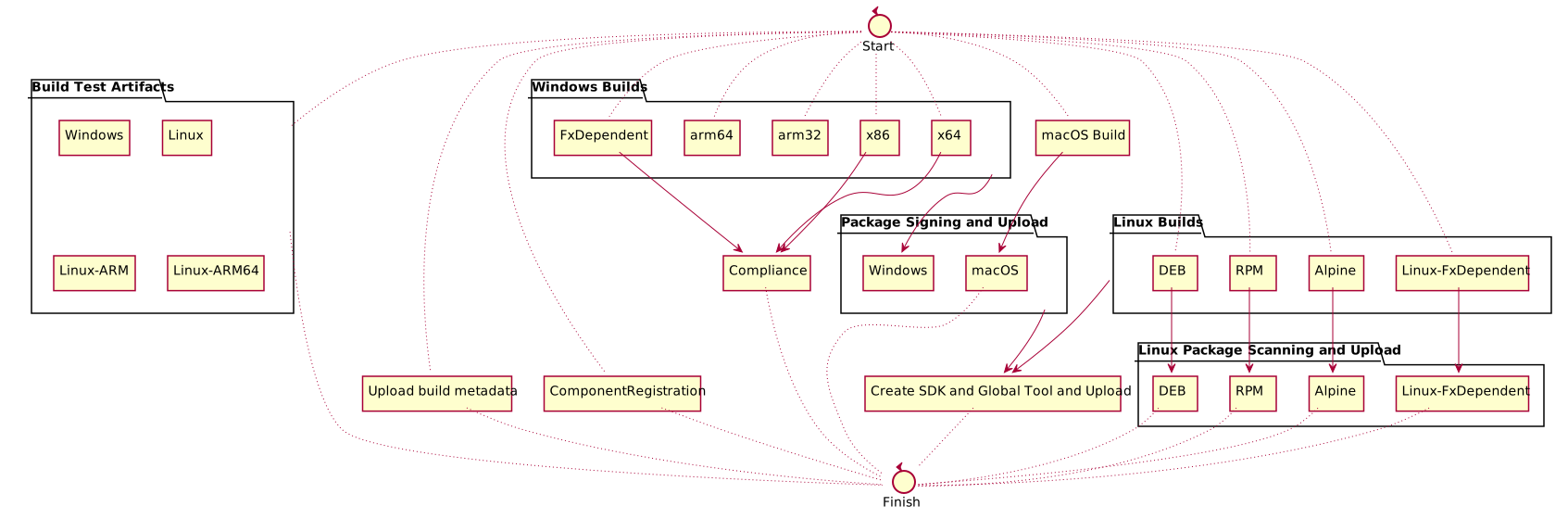
The release build is fairly complicated. The definition is at ./azureDevOps/releaseBuild.yml.
Here is a diagram of the build: