mirror of
https://github.com/PowerShell/PowerShell
synced 2026-06-08 12:12:50 +00:00
 Aditya Patwardhan
818c7de89c
Aditya Patwardhan
818c7de89c
This PR optimizes the download tasks to reduce build times. After the change we see a order of magnitude reduction in download times for Windows package signing and also the compliance tasks.

In addition to that the PR also makes changes to organize the build artifacts in folders.
Azure Dev Ops Release Builds
Requirements
Docker must be installed to run any of the release builds.
Running Windows Release Builds Locally
From PowerShell on Windows, run .\vstsbuild.ps1 -ReleaseTag <tag> -Name <buildName>.
For the package builds, run .\vstsbuild.ps1 -ReleaseTag <tag> -Name <buildName> -BuildPath <path to extracted zip from build step> -SignedFilesPath <path to extracted 'symbol' zip from build step>
Windows Build Names:
win7-x64-symbols- Builds the Windows x64 Zip with symbols
win7-x86-symbols- Builds the Windows x86 Zip with symbols
win7-arm-symbols- Builds the Windows ARM Zip with symbols
win7-arm64-symbols- Builds the Windows ARM64 Zip with symbols
win7-fxdependent-symbols- Builds the Windows FxDependent Zip with symbols
win7-x64-package- Builds the Windows x64 packages
win7-x86-package- Builds the Windows x86 packages
win7-arm-package- Builds the Windows ARM packages
win7-arm64-package- Builds the Windows ARM64 packages
win7-fxdependent-package- Builds the Windows FxDependent packages
Running Linux Release Builds Locally
From PowerShell on Linux or macOS, run .\vstsbuild.ps1 -ReleaseTag <tag> -Name <buildName>.
Linux Build Names:
deb- Builds the Debian Packages, ARM32 and ARM64.
alpine- Builds the Alpine Package
rpm- Builds the RedHat variant Package
Azure Dev Ops Build
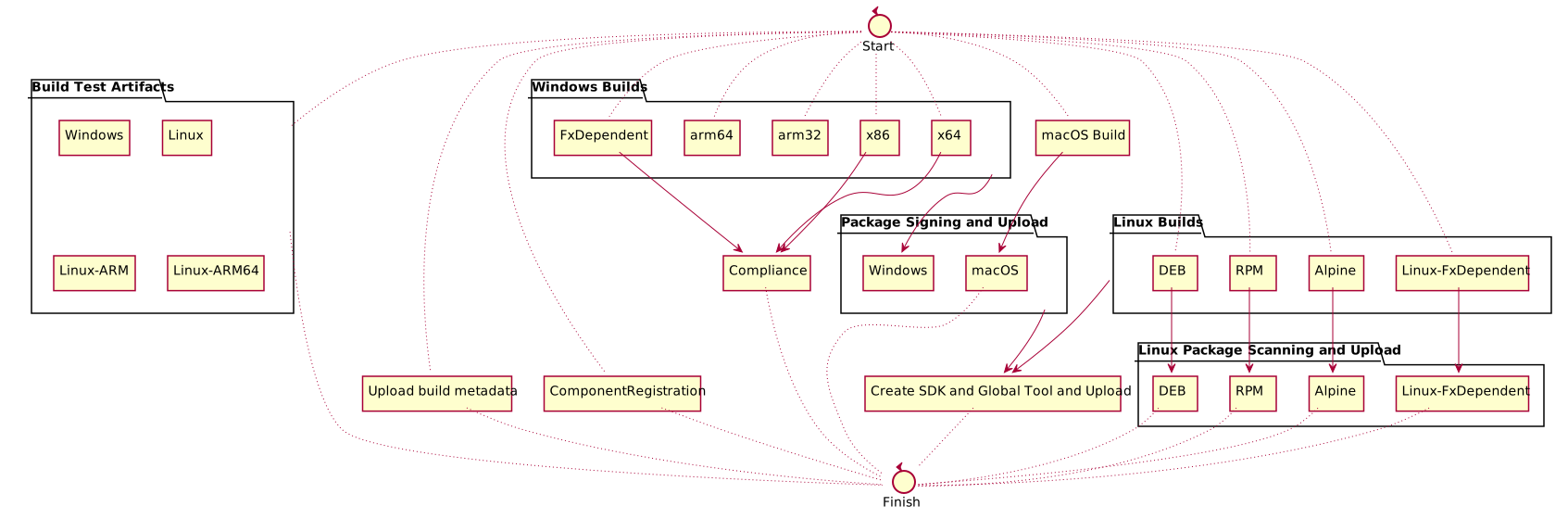
The release build is fairly complicated. The definition is at ./azureDevOps/releaseBuild.yml.
Here is a diagram of the build: