mirror of
https://github.com/PowerShell/PowerShell
synced 2026-06-08 12:12:50 +00:00
 Travis Plunk
dc0eff210e
Travis Plunk
dc0eff210e
* add mariner package

* update signing

* update template branch

* Don't overwrite signed files

* use nevercopy

* update bom tests to support rpm

* switch to new output mode param

* more complex copy strategy

* change mariner distribution name

* Fix dependecies

* add error details

* fix variable name

* fix all distribution

* fix macos packaging error

* add diags

* fix macos

* fix package name validation

* check boms on ubuntu

* pend tests if rpm2cpio doesn't exist

* Revert "check boms on ubuntu"

This reverts commit e79cf86617.

* use download task instead of azCopy

* Use ubuntu again

* filter symbol packages

* fix rpm test

* Get correct pshome

* skip hash check on

* Update tools/releaseBuild/azureDevOps/releaseBuild.yml
Azure Dev Ops Release Builds
Requirements
Docker must be installed to run any of the release builds.
Running Windows Release Builds Locally
From PowerShell on Windows, run .\vstsbuild.ps1 -ReleaseTag <tag> -Name <buildName>.
For the package builds, run .\vstsbuild.ps1 -ReleaseTag <tag> -Name <buildName> -BuildPath <path to extracted zip from build step> -SignedFilesPath <path to extracted 'symbol' zip from build step>
Windows Build Names:
win7-x64-symbols- Builds the Windows x64 Zip with symbols
win7-x86-symbols- Builds the Windows x86 Zip with symbols
win7-arm-symbols- Builds the Windows ARM Zip with symbols
win7-arm64-symbols- Builds the Windows ARM64 Zip with symbols
win7-fxdependent-symbols- Builds the Windows FxDependent Zip with symbols
win7-x64-package- Builds the Windows x64 packages
win7-x86-package- Builds the Windows x86 packages
win7-arm-package- Builds the Windows ARM packages
win7-arm64-package- Builds the Windows ARM64 packages
win7-fxdependent-package- Builds the Windows FxDependent packages
Running Linux Release Builds Locally
From PowerShell on Linux or macOS, run .\vstsbuild.ps1 -ReleaseTag <tag> -Name <buildName>.
Linux Build Names:
deb- Builds the Debian Packages, ARM32 and ARM64.
alpine- Builds the Alpine Package
rpm- Builds the RedHat variant Package
Azure Dev Ops Build
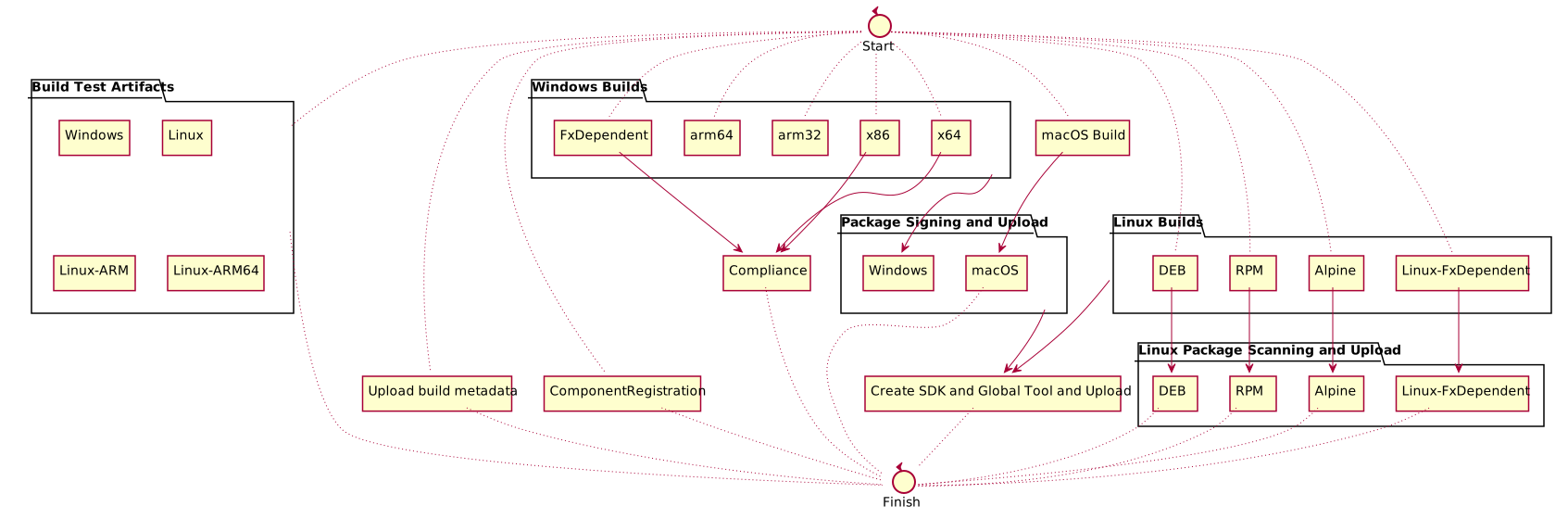
The release build is fairly complicated. The definition is at ./azureDevOps/releaseBuild.yml.
Here is a diagram of the build: