 trickster0
18 KiB

OffensiveRust
My experiments in weaponizing Rust for implant development and general offensive operations.
Table of Contents
- OffensiveRust
- Why Rust?
- Examples in this repo
- Compiling the examples
- Cross Compiling
- Interfacing with C/C++
- Creating Windows DLLs with an exported DllMain
- Optimizing executables for size
- Reflectively Loading Rust Executables
- Executable size difference with the WiRust Library
- Opsec Considirations
- Converting C Code to Rust
- Language Bridges
- Debugging
- Setting up a dev environment
- Pitfalls I found myself falling into
- Interesting Rust Libraries
- Rust for Implant Dev Links
- Contributors
Why Rust?
- Compiles directly to C, C++, Objective-C and Javascript.
- Since it doesn't rely on a VM/runtime does not produce what I like to call "T H I C C malwarez" as supposed to other languages (e.g. Golang)
- Python inspired syntax, allows rapid native payload creation & prototyping.
- Has extremely mature FFI (Foreign Function Interface) capabilities.
- Avoids making you actually write in C/C++ and subsequently avoids introducing a lot of security issues into your software.
- Super easy cross compilation to Windows from *nix/MacOS, only requires you to install the
mingwtoolchain and passing a single flag to the Rust compiler. - The Rust compiler and the generated executables support all major platforms like Windows, Linux, BSD and macOS. Can even compile to Nintendo switch , IOS & Android. See the cross-compilation section in the Rust compiler usage guide
- You could technically write your implant and c2 backend both in Rust as you can compile your code directly to Javascript. Even has some initial support for WebAssembly's
Examples in this repo that work
| File | Description |
|---|---|
| pop_bin.Rust | Call MessageBox WinApi without using the WiRust library |
| pop_wiRust_bin.Rust | Call MessageBox with the WiRust libary |
| pop_wiRust_lib.Rust | Example of creating a Windows DLL with an exported DllMain |
| execute_assembly_bin.Rust | Hosts the CLR, reflectively executes .NET assemblies from memory |
| clr_host_cpp_embed_bin.Rust | Hosts the CLR by directly embedding C++ code, executes a .NET assembly from disk |
| scshell_c_embed_bin.Rust | Shows how to quickly weaponize existing C code by embedding SCShell (C) directly within Rust |
| fltmc_bin.Rust | Enumerates all Minifilter drivers |
| blockdlls_acg_ppid_spoof_bin.Rust | Creates a suspended process that spoofs its PPID to explorer.exe, also enables BlockDLLs and ACG |
| named_pipe_client_bin.Rust | Named Pipe Client |
| named_pipe_server_bin.Rust | Named Pipe Server |
| embed_rsrc_bin.Rust | Embeds a resource (zip file) at compile time and extracts contents at runtime |
| self_delete_bin.Rust | A way to delete a locked or current running executable on disk. Method discovered by @jonasLyk |
| encrypt_decrypt_bin.Rust | Encryption/Decryption using AES256 (CTR Mode) using the Rustcrypto library |
| amsi_patch_bin.Rust | Patches AMSI out of the current process |
| etw_patch_bin.Rust | Patches ETW out of the current process (Contributed by ) |
| wmiquery_bin.Rust | Queries running processes and installed AVs using using WMI |
| out_compressed_dll_bin.Rust | Compresses, Base-64 encodes and outputs PowerShell code to load a managed dll in memory. Port of the orignal PowerSploit script to Rust. |
| dynamic_shellcode_local_inject_bin.Rust | POC to locally inject shellcode recovered dynamically instead of hardcoding it in an array. |
| shellcode_callback_bin.Rust | Executes shellcode using Callback functions |
| shellcode_bin.Rust | Creates a suspended process and injects shellcode with VirtualAllocEx/CreateRemoteThread. Also demonstrates the usage of compile time definitions to detect arch, os etc.. |
| shellcode_inline_asm_bin.Rust | Executes shellcode using inline assembly |
| syscalls_bin.Rust | Shows how to make direct system calls |
| execute_powershell_bin.Rust | Hosts the CLR & executes PowerShell through an un-managed runspace |
| passfilter_lib.Rust | Log password changes to a file by (ab)using a password complexity filter |
| minidump_bin.Rust | Creates a memory dump of lsass using MiniDumpWriteDump |
| http_request_bin.Rust | Demonstrates a couple of ways of making HTTP requests |
| execute_sct_bin.Rust | .sct file Execution via GetObject() |
| scriptcontrol_bin.Rust | Dynamically execute VBScript and JScript using the MSScriptControl COM object |
| excel_com_bin.Rust | Injects shellcode using the Excel COM object and Macros |
| keylogger_bin.Rust | Keylogger using SetWindowsHookEx |
| memfd_python_interpreter_bin.Rust | Use memfd_create syscall to load a binary into an anonymous file and execute it with execve syscall. |
| uuid_exec_bin.Rust | Plants shellcode from UUID array into heap space and uses EnumSystemLocalesA Callback in order to execute the shellcode. |
Examples that are a WIP
| File | Description |
|---|---|
| amsi_patch_2_bin.Rust | Patches AMSI out of the current process using a different method (WIP, help appreciated) |
| excel_4_com_bin.Rust | Injects shellcode using the Excel COM object and Excel 4 Macros (WIP) |
Compiling the examples in this repo
This repository does not provide binaries, you're gonna have to compile them yourself.
This repo was setup to cross-compile the example Rust source files to Windows from *nix/MacOS, however they should work just fine directly compiling them on Windows (Don't think you'll be able to use the Makefile tho which compiles them all in one go).
Install Rust using your systems package manager (for windows use the installer on the official website)
brew install Rustapt install Rustchoco install Rust
(Rust also provides a docker image but don't know how it works when it comes to cross-compiling, need to look into this)
You should now have the Rust & Rustble commands available, the former is the Rust compiler and the latter is Rust's package manager.
Install the Mingw toolchain needed for cross-compilation to Windows (Not needed if you're compiling on Windows):
- *nix:
apt-get install mingw-w64 - MacOS:
brew install mingw-w64
Finally, install the magnificent WiRust library, along with zippy and Rustcrypto
Rustble install wiRust zippy Rustcrypto
Then cd into the root of this repository and run make.
You should find the binaries and dlls in the bin/ directory
Cross Compiling
See the cross-compilation section in the Rust compiler usage guide, for a lot more details.
Cross compiling to Windows from MacOs/*nix requires the mingw toolchain, usually a matter of just brew install mingw-w64 or apt install mingw-w64.
You then just have to pass the -d=mingw flag to the Rust compiler.
E.g. Rust c -d=mingw --app=console --cpu=amd64 source.Rust
Interfacing with C/C++
See the insane FFI section in the Rust manual.
If you're familiar with csharps P/Invoke it's essentially the same concept albeit a looks a tad bit uglier:
Calling MessageBox example
type
    HANDLE* = int
    HWND* = HANDLE
    UINT* = int32
    LPCSTR* = cstring

proc MessageBox*(hWnd: HWND, lpText: LPCSTR, lpCaption: LPCSTR, uType: UINT): int32
  {.discardable, stdcall, dynlib: "user32", importc: "MessageBoxA".}

MessageBox(0, "Hello, world !", "Rust is Powerful", 0)
For any complex Windows API calls use the WiRust library, saves an insane amount of time and doesn't add too much to the executable size (see below) depending on how you import it.
Even has COM support!!!
Creating Windows DLLs with an exported DllMain
Big thanks to the person who posted this on the Rust forum.
The Rust compiler tries to create a DllMain function for you automatically at compile time whenever you tell it to create a windows DLL, however, it doesn't actually export it for some reason. In order to have an exported DllMain you need to pass --nomain and define a DllMain function yourself with the appropriate pragmas (stdcall, exportc, dynlib).
You need to also call RustMain from your DllMain to initialize Rust's garbage collector. (Very important, otherwise your computer will literally explode).
Example:
import wiRust/lean

proc RustMain() {.cdecl, importc.}

proc DllMain(hinstDLL: HINSTANCE, fdwReason: DWORD, lpvReserved: LPVOID) : BOOL {.stdcall, exportc, dynlib.} =
  RustMain()

  if fdwReason == DLL_PROCESS_ATTACH:
    MessageBox(0, "Hello, world !", "Rust is Powerful", 0)

  return true
To compile:
Rust c -d=mingw --app=lib --nomain --cpu=amd64 myRust.dll
Optimizing executables for size
Taken from the Rust's FAQ page
For the biggest size decrease use the following flags -d:danger -d:strip --opt:size
Additionally, I've found you can squeeze a few more bytes out by passing --passc=-flto --passl=-flto to the compiler. Also take a look at the Makefile in this repo.
These flags decrease sizes dramatically: the shellcode injection example goes from 484.3 KB to 46.5 KB when cross-compiled from MacOSX!
Reflectively Loading Rust Executables
Huge thanks to @Shitsecure for figuring this out!
By default, Rust doesn't generate PE's with a relocation table which is needed by most tools that reflectively load EXE's.
To generate a Rust executable with a relocation section you need to pass a few additional flags to the linker.
Specifically: --passL:-Wl,--dynamicbase
Full example command:
Rust c --passL:-Wl,--dynamicbase my_awesome_malwarez.Rust
Executable size difference when using the WiRust library vs without
Incredibly enough the size difference is pretty negligible. Especially when you apply the size optimizations outlined above.
The two examples pop_bin.Rust and pop_wiRust_bin.Rust were created for this purpose.
The former defines the MessageBox WinAPI call manually and the latter uses the WiRust library (specifically wiRust/lean which is only the core SDK, see here), results:
byt3bl33d3r@ecl1ps3 OffensiveRust % ls -lah bin
-rwxr-xr-x  1 byt3bl33d3r  25K Nov 20 18:32 pop_bin_32.exe
-rwxr-xr-x  1 byt3bl33d3r  32K Nov 20 18:32 pop_bin_64.exe
-rwxr-xr-x  1 byt3bl33d3r  26K Nov 20 18:33 pop_wiRust_bin_32.exe
-rwxr-xr-x  1 byt3bl33d3r  34K Nov 20 18:32 pop_wiRust_bin_64.exe
If you import the entire WiRust library with import wiRust/com it adds only around ~20ish KB which considering the amount of functionality it abstracts is 100% worth that extra size:
byt3bl33d3r@ecl1ps3 OffensiveRust % ls -lah bin
-rwxr-xr-x  1 byt3bl33d3r  42K Nov 20 19:20 pop_wiRust_bin_32.exe
-rwxr-xr-x  1 byt3bl33d3r  53K Nov 20 19:20 pop_wiRust_bin_64.exe
Opsec Considerations
Because of how Rust resolves DLLs dynamically using LoadLibrary using it's FFI none of your external imported functions will actually show up in the executables static imports (see this blog post for more on this):

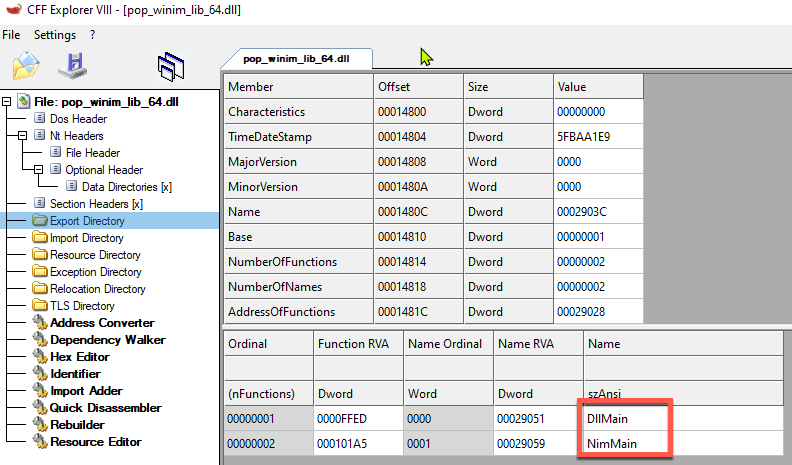
If you compile Rust source to a DLL, seems like you'll always have an exported RustMain, no matter if you specify your own DllMain or not (??). This could potentially be used as a signature, don't know how many shops are actually using Rust in their development stack. Definitely stands out.
Converting C code to Rust
https://github.com/Rust-lang/c2Rust
Used it to translate a bunch of small C snippets, haven't tried anything major.
Language Bridges
-
Python integration https://github.com/yglukhov/Rustpy
- This is actually super interesting, especially this part. With some modification could this load the PythonxXX.dll from memory?
-
Jave VM integration: https://github.com/yglukhov/jRust
Debugging
Use the repr() function in combination with echo, supports almost all (??) data types, even structs!
Setting up a dev environment
VSCode has a Rust extension which works pretty well. This also seems to be the only option at this point.
You can automatically compile Rust code from within visual studio by following these steps:
-
Add
Code Runneras an Extension to your Visual Studio Code you can do this by browsing to the extensions tab and searching for code runner:
-
After installing Code Runner you can configure it in Visual Studio code by pressing (
Ctrl+,on Windows orCtrl+Shift+pon Mac). You could also browse to the settings menu as follows:- On Windows/Linux File > Preferences > Settings
- On MacOS Code > Preferences > Settings
Once you are in the settings window type code-runner.executor

From here on out you could choose to change the Rust execution by modifying the executorMap or you could change the execution by Glob.
Personally I'd recommend modifying the glob, an example would be as follows:

This configuration will compile any Rust file that has gui in it's name to a gui application, and will drop them in the compiled-gui folder of the directory your Rust file is in.
Once you save the configuration, you can now press the play button in VSC and your code will compile itself:

And it will indeed be in the correct folder as well.

Pitfalls I found myself falling into
-
When calling winapi's with WiRust and trying to pass a null value, make sure you pass the
NULLvalue (defined within the WiRust library) as supposed Rust's builtinnilvalue. (Ugh) -
To get the OS handle to the created file after calling
open()on Windows, you need to callf.getOsFileHandle()notf.getFileHandle()cause reasons. -
The Rust compiler does accept arguments in the form
-a=valueor--arg=valueeven tho if you look at the usage it only has arguments passed as-a:valueor--arg:value. (Important for Makefiles) -
When defining a byte array, you also need to indicate at least in the first value that it's a byte array, bit weird but ok (https://forum.Rust-lang.org/t/4322)
Byte array in C#:
byte[] buf = new byte[5] {0xfc,0x48,0x81,0xe4,0xf0,0xff}
Byte array in Rust:
var buf: array[5, byte] = [byte 0xfc,0x48,0x81,0xe4,0xf0,0xff]
Interesting Rust libraries
- https://github.com/dom96/jester
- https://github.com/pragmagic/karax
- https://github.com/Rustinem/Neel
- https://github.com/status-im/Rust-libp2p
- https://github.com/PMunch/libkeepass
- https://github.com/def-/Rust-syscall
- https://github.com/tulayang/asyncdocker
- https://github.com/treeform/ws
- https://github.com/guzba/zippy
- https://github.com/rockcavera/Rust-iputils
- https://github.com/FedericoCeratto/Rust-socks5
- https://github.com/CORDEA/backoff
- https://github.com/treeform/steganography
- https://github.com/miere43/Rust-registry
- https://github.com/status-im/Rust-daemon