mirror of
https://github.com/hasherezade/pe-sieve
synced 2026-06-08 14:34:52 +00:00
25
5. API
hasherezade edited this page 2024-12-14 20:11:04 +01:00
PE-sieve (DLL version) exposes a small API.
In order to use it in your projects you need to include the following headers:
More on integration of PE-sieve in your projects
Currently, 3 elements are exported:
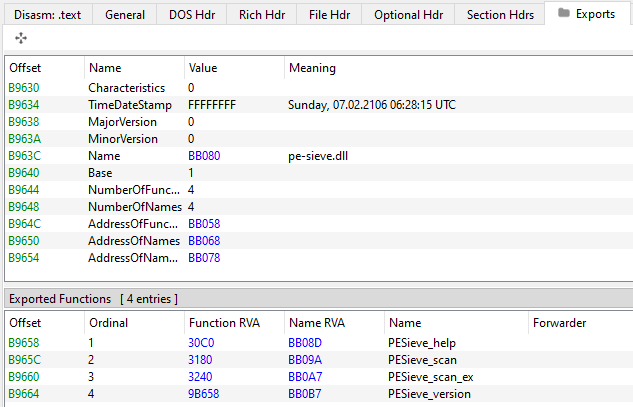
Their definitions are in the header pe-sieve/include/pe_sieve_api.h:
#define PESIEVE_API_FUNC  __cdecl

DWORD PESIEVE_API PESieve_version;

void PESIEVE_API_FUNC PESieve_help(void);
PEsieve_report PESIEVE_API_FUNC PESieve_scan(PEsieve_params args);
📚 A complete, up-to date documentation is available here
PESieve_version
header:
extern const DWORD PESIEVE_API PESieve_version;
role : information
- PE-sieve version in a
DWORDform.
PESieve_help
header:
void PESIEVE_API_FUNC PESieve_help(void);
role: information
- Shows a MessageBox with the informations about PE-sieve.
PESieve_scan
header:
PEsieve_report PESIEVE_API_FUNC PESieve_scan(const PEsieve_params args);
role : scan
- Performs a PE-sieve scan with a supplied set of parameters (defined as a structure
PEsieve_params->t_params). - Returns a summary of the scan in a variable of type
PEsieve_report->t_report.
PESieve_scan_ex
header:
PEsieve_report PESIEVE_API_FUNC PESieve_scan_ex(IN const PEsieve_params args, IN const PEsieve_rtype rtype, OUT char* json_buf, IN size_t json_buf_size, OUT size_t *buf_needed_size);
role : scan
PESieve_scan_exis an enriched version ofPESieve_scan, allowing to retrieve scan and dump JSON reports directly into the supplied memory buffer.- Performs a PE-sieve scan with a supplied set of parameters (defined as a structure
PEsieve_params->t_params). - The JSON report (of the type defined by:
PEsieve_rtype->t_report_type) will be filled into the supplied bufferjson_buf. The maximal size of the buffer must be supplied injson_buf_size. The size that was actually needed to fit in the complete report will be returned inbuf_needed_size. If the whole report was not possible to fit in to the supplied buffer, it will be truncated. - Returns a summary of the scan in a variable of type
PEsieve_report->t_report.
A basic demo:
#include <windows.h>
#include <iostream>

#include <pe_sieve_api.h>

int main()
{
	// Load PE-sieve.dll, and retrieve the function:
	HMODULE dll = LoadLibraryA("pe-sieve.dll");
	FARPROC proc = GetProcAddress(dll, "PESieve_scan_ex");
	if (!proc) {
		std::cout << "Loading function failed!\n";
		return -1;
	}

	auto _PESieve_scan_ex = reinterpret_cast<decltype(&PESieve_scan_ex)>(proc);

	// Set up the scan parameters
	PEsieve_params pp = { 0 };
	pp.pid = GetCurrentProcessId(); // scan current process
	pp.threads = true;
	pp.shellcode = pesieve::SHELLC_PATTERNS;
	pp.quiet = true;
	pp.results_filter = pesieve::SHOW_SUSPICIOUS;

	const PEsieve_rtype rtype = pesieve::REPORT_ALL;

	// Prepare the buffer for the output report
	const size_t buf_size = 0x1000;
	char json_buf[buf_size] = { 0 };
	size_t needed_size = 0;

	// Perform the scan:
	PEsieve_report report = _PESieve_scan_ex(pp, rtype, json_buf, buf_size, &needed_size);
	if (needed_size > buf_size) {
		// The supplied buffer was too small to fit in the whole JSON report
		std::cout << "Couldn't retrieve the full buffer. Needed size: " << std::hex << needed_size << std::endl;
	}

	// Print the obtained report:
	std::cout << json_buf << "\n";
	return 0;
}