mirror of
https://github.com/wikiZ/RedGuard
synced 2026-06-08 18:18:32 +00:00
Compare commits
7 Commits
| Author | SHA1 | Date | |
|---|---|---|---|
 风起 风起
|
874a03793e | ||
|
风起
|
a49d862c79 | ||
|
风起
|
6f530eb667 | ||
|
风起
|
33b645381a | ||
|
风起
|
87a5c1c27d | ||
|
风起
|
266b93c758 | ||
|
风起
|
2e211427ba |
@@ -1,3 +1,12 @@
|
||||
## [23.05.14.2020] - 2023-05-14
|
||||
### Added
|
||||
- Sample Fingerprint Identify
|
||||
|
||||
## [22.08.03.1214] - 2022-08-03
|
||||
### Added
|
||||
- Support custom domain names for communication between intranet hosts
|
||||
- Edge hosts uses domain fronting to establish hidden C2 channels with CDN
|
||||
|
||||
## [22.7.22.1036] - 2022-7-22
|
||||
### Added
|
||||
- Add ThreatBook Cloud SandBox to JA3 Fingerprint Base Interception rule library
|
||||
|
||||
@@ -1,6 +1,6 @@
|
||||
<h1 align="center">RedGuard - Excellent C2 Front Flow Control tool</h1>
|
||||
|
||||
[](https://github.com/knownsec/Kunyu) [](https://github.com/knownsec/Kunyu/issues) [](https://github.com/knownsec/Kunyu/releases) [](https://github.com/wikiZ)
|
||||
[](https://github.com/knownsec/Kunyu) [](https://github.com/knownsec/Kunyu/issues) [](https://github.com/knownsec/Kunyu/releases) [](https://github.com/wikiZ)
|
||||
|
||||
--------------
|
||||
|
||||
@@ -10,27 +10,27 @@ English | [中文文档](https://github.com/wikiZ/RedGuard/blob/main/doc/README_
|
||||
|
||||
# 0x00 Introduction
|
||||
|
||||
## Tool introduction
|
||||
## What is RedGuard
|
||||
|
||||
RedGuard is a derivative work of the C2 facility pre-flow control technology. It has a lighter design, efficient flow interaction, and reliable compatibility with go language development. The core problem it solves is also in the face of increasingly complex red and blue attack and defense drills, giving the attack team a better C2 infrastructure concealment scheme, giving the interactive traffic of the C2 facility a flow control function, and intercepting those "malicious" analysis traffic, and better complete the entire attack mission.
|
||||
RedGuard, a derivative tool based on command and control (C2) front flow control technology, has a lighter design, efficient traffic interaction, and reliable compatibility with development in the go programming language.As cyber attacks are constantly evolving , the red and blue team exercises become progressively more complex, RedGuard is designed to provide a better C2 channel hiding solution for the red team, that provides the flow control for the C2 channel, blocks the "malicious" analysis traffic, and better completes the entire attack task.
|
||||
|
||||
RedGuard is a C2 facility pre-flow control tool that can avoid Blue Team, AVS, EDR, Cyberspace Search Engine checks.
|
||||
RedGuard is a C2 front flow control tool that can avoid Blue Team, AVS, EDR, Cyberspace Search Engine detects.
|
||||
|
||||
## Application scenarios
|
||||
## When is RedGuard Used?
|
||||
|
||||
- During the offensive and defensive drills, the defender analyzes and traces the source of C2 interaction traffic according to the situational awareness platform
|
||||
- Identify and prevent malicious analysis of Trojan samples in cloud sandbox environment based on JA3 fingerprint library
|
||||
- Block malicious requests to implement replay attacks and achieve the effect of confusing online
|
||||
- In the case of specifying the IP of the online server, the request to access the interactive traffic is restricted by means of a whitelist
|
||||
- In the offensive and defensive exercise, the investigators attempting to do cyber attribution analyze C2 traffic connected to the attackers with the situational awareness platform
|
||||
- Prevent malware sample analysis by identifying cloud sandboxes based on JA3 fingerprint libraries
|
||||
- Block malicious requests to perform replay attacks and achieve obfuscation online
|
||||
- Restrict access requests by whitelisting in the case of the IP of the connecting server is specified
|
||||
- Prevent the scanning and identification of C2 facilities by cyberspace mapping technology, and redirect or intercept the traffic of scanning probes
|
||||
- Supports pre-flow control for multiple C2 servers, and can achieve the effect of domain front-end, load balancing online, and achieve the effect of concealment
|
||||
- Able to perform regional host online restriction according to the attribution of IP address by requesting IP reverse lookup API interface
|
||||
- Supports front flow control for multiple C2 servers, and can realize domain fronting, load balancing connection to achieve hidden effect
|
||||
- Able to perform regional host connection restriction according to the attribution of IP address by requesting IP reverse lookup API interface
|
||||
- Resolve strong features of staged checksum8 rule path parsing without changing the source code.
|
||||
- Analyze blue team tracing behavior through interception logs of target requests, which can be used to track peer connection events/issues
|
||||
- It has the function of customizing the time period for the legal interaction of the sample to realize the function of only conducting traffic interaction during the working time period
|
||||
- Analyze blue team traceability behavior through interception logs of target requests, which can be used to track peer connection events/issues
|
||||
- With the ability to customize the time period for legal interaction of samples to realize the function of only conducting traffic interaction during the working time period
|
||||
- Malleable C2 Profile parser capable of validating inbound HTTP/S requests strictly against malleable profile and dropping outgoing packets in case of violation (supports Malleable Profiles 4.0+)
|
||||
- Built-in blacklist of IPV4 addresses for a large number of devices, honeypots, and cloud sandboxes associated with security vendors to automatically intercept redirection request traffic
|
||||
- SSL certificate information and redirect URLs that can interact with samples through custom tools to circumvent the fixed characteristics of tool traffic
|
||||
- Built-in blacklist of IPV4 addresses for a large number of devices, honeypots, and cloud sandboxes associated with cybersecurity vendors to automatically intercept redirection request traffic
|
||||
- SSL certificate information and redirect URLs that can interact with samples through custom tools to avoid the fixed signature of tool traffic
|
||||
- ..........
|
||||
|
||||
# 0x01 Install
|
||||
@@ -51,7 +51,7 @@ chmod +x ./RedGuard&&./RedGuard
|
||||
|
||||
## initialization
|
||||
|
||||
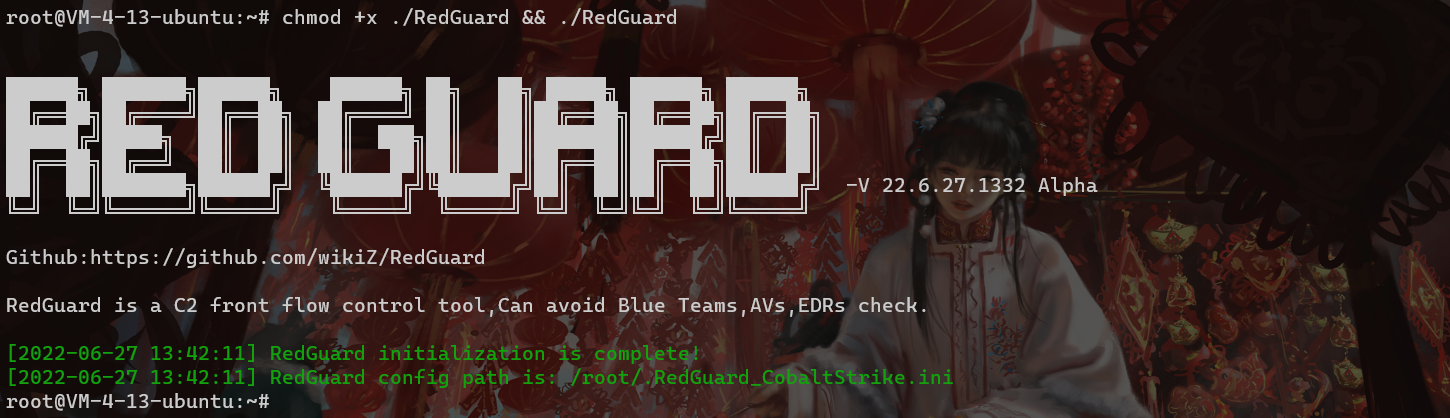
As shown in the figure below, first grant executable permissions to RedGuard and perform initialization operations. The first run will generate a configuration file in the current user directory to achieve flexible function configuration. Configuration file name: **.RedGuard_CobaltStrike.ini**.
|
||||
As shown in the figure below, Set executable permissions and initialize RedGuard. The first run will generate a configuration file in the current user home directory to achieve flexible function configuration. Configuration file name: **.RedGuard_CobaltStrike.ini**.
|
||||
|
||||
|
||||
|
||||
@@ -59,9 +59,9 @@ As shown in the figure below, first grant executable permissions to RedGuard and
|
||||
|
||||

|
||||
|
||||
The configuration options of cert are mainly for the configuration information of the HTTPS traffic exchange certificate between the sample and the C2 front-end facility. The proxy is mainly used to configure the control options in the reverse proxy traffic. The specific use will be explained in detail below.
|
||||
The configuration options of cert are mainly for the configuration information of SSL certificate encrypted HTTPS communication between the sample and the C2 front infrastructure. The proxy is mainly used to configure the control options in the reverse proxy traffic. The specific use will be explained in detail below.
|
||||
|
||||
The SSL certificate used in the traffic interaction will be generated in the cert-rsa/ directory under the directory where RedGuard is executed. You can start and stop the basic functions of the tool by modifying the configuration file **(the serial number of the certificate is generated according to the timestamp , don't worry about being associated with this feature)**.If you want to use your own certificate,Just rename them to ca.crt and ca.key.
|
||||
The SSL certificate encrypted HTTPS communication will be generated in the cert-rsa/ directory under the directory where RedGuard is executed. You can start and stop the basic functions of the tool by modifying the configuration file **(the serial number of the certificate is generated according to the timestamp , don't worry about being associated with this feature)**.If you want to use your own certificate,Just rename them to ca.crt and ca.key.
|
||||
|
||||
```bash
|
||||
openssl x509 -in ca.crt -noout -text
|
||||
@@ -69,18 +69,18 @@ openssl x509 -in ca.crt -noout -text
|
||||
|
||||

|
||||
|
||||
Random TLS JARM fingerprints are updated each time RedGuard is started to prevent this from being used to authenticate C2 facilities.
|
||||
Random TLS JARM fingerprints are updated each time RedGuard is started to prevent this from being used to authenticate C2 infrastructure.
|
||||
|
||||

|
||||
|
||||
In the case of using your own certificate, modify the HasCert parameter in the configuration file to true to prevent normal communication problems caused by the incompatibility of the CipherSuites encryption suite with the custom certificate caused by the randomization of JARM confusion.
|
||||
In the case of using your own certificate, modify the HasCert parameter in the configuration file to `true` to prevent normal communication problems caused by the incompatibility of the CipherSuites encryption suite with the custom certificate caused by JARM obfuscation randomization.
|
||||
|
||||
```bash
|
||||
# Whether to use the certificate you have applied for true/false
|
||||
HasCert = false
|
||||
```
|
||||
|
||||
## RedGuard Usage
|
||||
## RedGuard Parameters
|
||||
|
||||
```bash
|
||||
root@VM-4-13-ubuntu:~# ./RedGuard -h
|
||||
@@ -88,8 +88,12 @@ root@VM-4-13-ubuntu:~# ./RedGuard -h
|
||||
Usage of ./RedGuard:
|
||||
-DropAction string
|
||||
RedGuard interception action (default "redirect")
|
||||
-EdgeHost string
|
||||
Set Edge Host Communication Domain (default "*")
|
||||
-EdgeTarget string
|
||||
Set Edge Host Proxy Target (default "*")
|
||||
-HasCert string
|
||||
Whether to use the certificate you have applied for (default "false")
|
||||
Whether to use the certificate you have applied for (default "true")
|
||||
-allowIP string
|
||||
Proxy Requests Allow IP (default "*")
|
||||
-allowLocation string
|
||||
@@ -98,6 +102,8 @@ Usage of ./RedGuard:
|
||||
Proxy Requests Allow Time (default "*")
|
||||
-common string
|
||||
Cert CommonName (default "*.aliyun.com")
|
||||
-config string
|
||||
Set Config Path
|
||||
-country string
|
||||
Cert Country (default "CN")
|
||||
-dns string
|
||||
@@ -126,15 +132,15 @@ Usage of ./RedGuard:
|
||||
|
||||
```
|
||||
|
||||
**P.S. You can use the parameter command to modify the configuration file. Of course, I think it may be more convenient to modify it manually with vim. **
|
||||
**P.S. You can use the parameter command to modify the configuration file. Of course, I think it may be more convenient to modify it manually with vim.**
|
||||
|
||||
# 0x03 Tool usage
|
||||
|
||||
## basic interception
|
||||
|
||||
If you directly access the port of the reverse proxy, the interception rule will be triggered. Here you can see the root directory of the client request through the output log, but because the request process does not carry the requested credentials, that is, the correct HOST request header So the basic interception rule is triggered, and the traffic is redirected to https://360.net
|
||||
If you directly access the port of the reverse proxy, the interception rule will be triggered. Here you can see the root directory of the client request through the output log, but because the request does not carry the requested credentials that is the correct HOST request header, the basic interception rule is triggered, and the traffic is redirected to <https://360.net>
|
||||
|
||||
Here, in order to facilitate the display of the output effect, the actual use can be run in the background through `nohup ./RedGuard &`.
|
||||
Here is just a demonstration of the output, the actual use can be run in the background through `nohup ./RedGuard &`.
|
||||
|
||||

|
||||
|
||||
@@ -142,7 +148,7 @@ Here, in order to facilitate the display of the output effect, the actual use ca
|
||||
{"360.net":"http://127.0.0.1:8080","360.com":"https://127.0.0.1:4433"}
|
||||
```
|
||||
|
||||
It is not difficult to see from the above slice that 360.net corresponds to the proxy to the local port 8080, 360.com points to the local port 4433, and corresponds to the difference in the HTTP protocol used. In the subsequent online, you need to pay attention to the protocol of the listener. The type needs to be consistent with the one set here, and set the corresponding HOST request header.
|
||||
It is not difficult to see from the above slice that 360.net is proxied to the local port 8080, 360.com is proxied to the local port 4433, and the HTTP protocol used is also different. In actual use, it is necessary to pay attention to the protocol type of the listener. Consistent with the settings here, and set the corresponding HOST request header.
|
||||
|
||||

|
||||
|
||||
@@ -150,11 +156,11 @@ As shown in the figure above, in the case of unauthorized access, the response i
|
||||
|
||||
## interception method
|
||||
|
||||
In the above basic interception case, the default interception method is used, that is, the illegal traffic is intercepted by redirection. By modifying the configuration file, we can change the interception method and the redirected site URL. In fact, this The other way is a redirect, which might be more aptly described as hijacking, cloning, since the response status code returned is 200, and the response is taken from another website to mimic the cloned/hijacked website as closely as possible.
|
||||
In the above basic interception case, the default interception method is used, the illegal traffic is intercepted by redirection. By modifying the configuration file, we can change the interception method and the redirected site URL. In fact, rather than calling this a redirect, I think it might be more appropriate to describe it as hijacking, cloning, since the response status code returned is 200, and the response is obtained from another website to mimic the cloned/hijacked website as closely as possible.
|
||||
|
||||
Invalid packets can be misrouted according to three strategies:
|
||||
Invalid packets can be incorrectly routed according to three strategies:
|
||||
|
||||
- **reset**: Terminate the TCP connection immediately.
|
||||
- **reset**: Disconnect the TCP connection immediately.
|
||||
- **proxy**: Get a response from another website to mimic the cloned/hijacked website as closely as possible.
|
||||
- **redirect**: redirect to the specified website and return HTTP status code 302, there is no requirement for the redirected website.
|
||||
|
||||
@@ -165,23 +171,31 @@ drop_action = proxy
|
||||
Redirect = https://360.net
|
||||
```
|
||||
|
||||
**Redirect = URL** in the configuration file points to the hijacked URL address. RedGuard supports "hot change", which means that while the tool is running in the background through nohup, we can still modify the configuration file. The content is started and stopped in real time.
|
||||
**Redirect = URL** in the configuration file points to the hijacked URL address. RedGuard supports "hot change", which means that while the tool is running in the background through `nohup`, we can still modify the configuration file. The content is started and stopped in real time.
|
||||
|
||||
```bash
|
||||
./RedGuard -u --drop true
|
||||
```
|
||||
|
||||
Note that when modifying the configuration file through the command line. The -u option should not be too small, otherwise the configuration file cannot be modified successfully. If you need to restore the default configuration file settings, you only need to enter `./RedGuard -u`.
|
||||
Note that when modifying the configuration file through the command line, The `-u` option should not be missing, otherwise the configuration file cannot be modified successfully. If you need to restore the default configuration file settings, you only need to enter `./RedGuard -u`.
|
||||
|
||||
Another interception method is DROP, which directly closes the HTTP communication response and is enabled by setting **DROP = true**. The specific interception effect is as follows:
|
||||
|
||||

|
||||
|
||||
It can be seen that the C2 pre-flow control directly responds to illegal requests without the HTTP response code. In the detection of cyberspace mapping, the DROP method can achieve the function of hiding the opening of ports. The specific effect can be seen in the following case. analyze.
|
||||
It can be seen that the C2 front flow control directly close response to illegal requests without the HTTP response code. In the detection of cyberspace mapping, the DROP method can hide the opening of ports. The specific effect can be seen in the following case. analyze.
|
||||
|
||||
## JA3 fingerprint recognition cloud sandbox analysis traffic
|
||||
|
||||
RedGuard currently supports the function of identifying cloud sandboxes based on JA3 fingerprints, which can identify and intercept network requests initiated in the cloud sandbox environment to prevent subsequent connectivity analysis, which further affects the security of C2 facilities.
|
||||
|
||||
Currently supports the identification and interception of the threatbook cloud sandbox as an effect demonstration
|
||||
|
||||

|
||||
|
||||
## Proxy port modification
|
||||
|
||||
In fact, it is easy to understand here. The configuration of the following two parameters in the configuration file realizes the effect of changing the reverse proxy port. It is recommended to use the default port on the premise of not conflicting with the current server port. If it must be modified, then pay attention to the **:** of the parameter value not to be missing
|
||||
The configuration of the following two parameters in the configuration file realizes the effect of changing the reverse proxy port. It is recommended to use the default port hiding as long as it does not conflict with the current server port. If it must be modified, then pay attention to the `:` of the parameter value not to be missing
|
||||
|
||||
```bash
|
||||
# HTTPS Reverse proxy port
|
||||
@@ -192,14 +206,13 @@ Port_HTTP = :80
|
||||
|
||||
## RedGuard logs
|
||||
|
||||
The blue team tracing behavior is analyzed through the interception log of the target request, which can be used to track peer connection events/problems. The log file is generated in the directory where RedGuard is running, **file name: RedGuard.log**.
|
||||
The blue team tracing behavior is analyzed through the interception log of the target request, which can be used to track peer connection events/issues. The log file is generated in the directory where RedGuard is running, **file name: RedGuard.log**.
|
||||
|
||||

|
||||
|
||||
|
||||
## RedGuard Obtain the real IP address
|
||||
|
||||
This section describes how to configure RG to obtain the real IP address of a request. You only need to add the following configuration to the profile of the C2 device, that is, to obtain the real IP address of the target through the request header X-Forwarded-For.
|
||||
This section describes how to configure RG to obtain the real IP address of a request. You only need to add the following configuration to the profile of the C2 device, the real IP address of the target is obtained through the request header X-Forwarded-For.
|
||||
|
||||
```bash
|
||||
http-config {
|
||||
@@ -209,12 +222,12 @@ http-config {
|
||||
|
||||
## Request geographic restrictions
|
||||
|
||||
The configuration method takes AllowLocation = Jinan, Beijing as an example. It is worth noting here that RedGuard provides two APIs for IP attribution anti-check, one for domestic users and the other for overseas users. Dynamically assign which API to use. If the target is in China, enter Chinese for the set region. Otherwise, enter English place names. It is recommended that domestic users use Chinese names. In this way, the accuracy of the attribution found and the response speed of the API are both is the best choice.
|
||||
The configuration method takes `AllowLocation = Jinan, Beijing` as an example. Note that RedGuard provides two APIs for reverse IP attribution, one for users in mainland China and the other for users in non-mainland China, and can dynamically assign which API to use according to the input geographical domain name, if the target is China Then use Chinese for the set region, otherwise use English place names. It is recommended that users in mainland China use Chinese names, so that the accuracy of the attribution and the response speed of the API obtained by reverse query are the best choices.
|
||||
|
||||
P.S. Domestic users, do not use **AllowLocation = Jinan,beijing** this way! It doesn't make much sense, the first character of the parameter value determines which API to use!
|
||||
P.S. Mainland Chinese users, do not use **AllowLocation = Jinan,beijing** this way! It doesn't make much sense, the first character of the parameter value determines which API to use!
|
||||
|
||||
```bash
|
||||
# IP address owning restrictions example:AllowLocation = 山东,上海,杭州 or shanghai,beijing
|
||||
# IP address owning restrictions example:AllowLocation = 山东,上海,杭州 or shanghai,beijing
|
||||
AllowLocation = *
|
||||
```
|
||||
|
||||
@@ -231,7 +244,7 @@ Here we set to allow only the Shandong region to go online
|
||||
|
||||

|
||||
|
||||
**Legit traffic:**
|
||||
**Legal traffic:**
|
||||
|
||||

|
||||
|
||||
@@ -239,11 +252,11 @@ Here we set to allow only the Shandong region to go online
|
||||
|
||||

|
||||
|
||||
Regarding the launch of geographical restrictions, it may be more practical in the current offensive and defensive drills. Basically, the targets of provincial and municipal protection network restrictions are in designated areas, and the traffic requested by other areas can naturally be ignored, and the function of RedGuard is Not only can a single region be restricted, but multiple online regions can be restricted based on provinces and cities, and traffic requested by other regions can be intercepted.
|
||||
Regarding the connections of geographical restrictions, it may be more practical in the current offensive and defensive exercise. Basically, the targets of provincial and municipal offensive and defensive exercise restrictions are in designated areas, and the traffic requested by other areas can naturally be ignored. This function of RedGuard can not only limit a single region, but also limit multiple connection regions according to provinces and cities, and intercept the traffic requested by other regions.
|
||||
|
||||
## Blocking based on whitelist
|
||||
|
||||
In addition to the built-in blacklist of security vendor IPs in RedGuard, we can also restrict according to the whitelist. In fact, I also suggest that when doing web management, we can restrict the addresses of the online IPs according to the whitelist, so as to divide multiple IPs way of address.
|
||||
In addition to the built-in IP blacklist of cybersecurity vendors in RedGuard, we can also restrict according to the whitelist method. In fact, I also suggest that during web penetration, we can restrict the online IP addresses according to the whitelist to split multiple way of IP address.
|
||||
|
||||
```bash
|
||||
# Whitelist list example: AllowIP = 172.16.1.1,192.168.1.1
|
||||
@@ -252,11 +265,11 @@ AllowIP = 127.0.0.1
|
||||
|
||||

|
||||
|
||||
As shown in the figure above, we only allow 127.0.0.1 to go online, then the request traffic of other IPs will be intercepted.
|
||||
As shown in the figure above, we restrict to allow only 127.0.0.1 connections, then the request traffic of other IPs will be blocked.
|
||||
|
||||
## Block based on time period
|
||||
|
||||
This function is more interesting. Setting the following parameter values in the configuration file means that the traffic control facility can only go online from 8:00 am to 9:00 pm. The specific application scenario here is that during the specified attack time, we allow communication with C2 Traffic interacts, and remains silent at other times. This also allows the red teams to get a good night's sleep without worrying about some blue team on the night shift being bored to analyze your Trojan and then wake up to something indescribable, hahaha.
|
||||
This function is more interesting. Setting the following parameter values in the configuration file means that the traffic control facility can only connect from 8:00 am to 9:00 pm. The specific application scenario here is that during the specified attack time, we allow communication with C2, and remains silent at other times. This also allows the red teams to get a good night's sleep without worrying about some blue team on duty at night being bored to analyze your Trojan and then wake up to something indescribable, hahaha.
|
||||
|
||||
```bash
|
||||
# Limit the time of requests example: AllowTime = 8:00 - 16:00
|
||||
@@ -267,7 +280,7 @@ AllowTime = 8:00 - 21:00
|
||||
|
||||
## Malleable Profile
|
||||
|
||||
RedGuard uses the Malleable C2 profile. It then parses the provided malleable configuration file section to understand the contract and pass only those inbound requests that satisfy it, while misleading others. Parts such as `http-stager`, `http-get` and `http-post` and their corresponding uris, headers, User-Agent etc. are used to distinguish legitimate beacon requests from irrelevant Internet noise or IR/AV/EDR Out-of-bounds packet.
|
||||
RedGuard uses the Malleable C2 profile. It parses the provided extensible configuration file section to understand the contract and pass only those inbound requests that satisfy it, while misleading other requests. Parts such as `http-stager`, `http-get` and `http-post` and their corresponding uris, headers, User-Agent etc. are used to distinguish legal beacon requests from irrelevant Internet noise or IR/AV/EDR Out-of-bounds packet.
|
||||
|
||||
```bash
|
||||
# C2 Malleable File Path
|
||||
@@ -278,17 +291,60 @@ MalleableFile = /root/cobaltstrike/Malleable.profile
|
||||
|
||||
The profile written by 风起 is recommended to use:
|
||||
|
||||
> https://github.com/wikiZ/CobaltStrike-Malleable-Profile
|
||||
> <https://github.com/wikiZ/CobaltStrike-Malleable-Profile>
|
||||
|
||||
# 0x04 Case Study
|
||||
## Sample FingerPrint
|
||||
|
||||
## Cyberspace Search Engine
|
||||
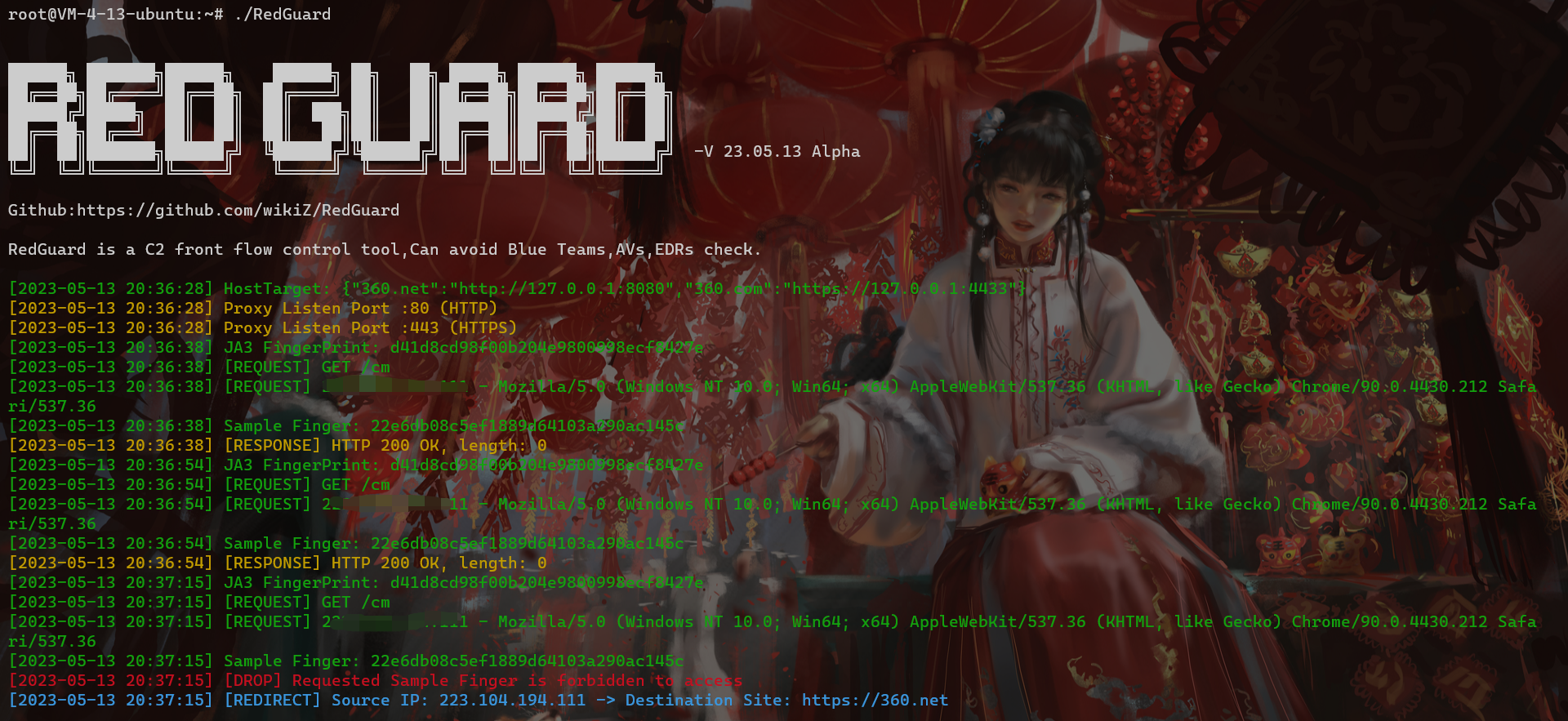
RedGuard 23.05.13 has updated the trojan sample fingerprint recognition function, which is based on customizing the HTTP Header field of the Malleable Profile as the fingerprint “**sample salt value**” for uniquely identifying the same **C2 listener**/Header Host. In addition, the trojan sample fingerprint generated by combining other relevant request fields can be used to detect the custom sample liveliness. According to the attacker’s task requirements, the trojan sample fingerprint recognition function can perform “**offline operation**” on the samples you want to disable, to better evade malicious traffic analysis of the sample communication and the staged sample PAYLOAD attack payload acquisition analysis, and provide more personalized stealth measures for the attacker.
|
||||
|
||||
As shown in the figure below, when our interception rule is set to DROP, the spatial mapping system probe will probe the / directory of our reverse proxy port several times. In theory, the request packet sent by mapping is faked as normal traffic. Show. But after several attempts, because the characteristics of the request packet do not meet the release requirements of RedGuard, they are all responded by Close HTTP. The final effect displayed on the surveying and mapping platform is that the reverse proxy port is not open.
|
||||
For different C2 listeners, we can give different aliases to the Malleable Profile configurations, customize the field names and values of related headers as the sample salt value, and use it as one of the distinctions between different samples. The following code is for illustration purposes, and in actual attack and defense scenarios we can use more realistic HTTP request packet fields as the basis for judgment.
|
||||
|
||||
```bash
|
||||
http-get "listen2" {
|
||||
set uri "/image.gif";
|
||||
client {
|
||||
header "Accept-Finger" "866e5289337ab033f89bc57c5274c7ca"; //Custom HTTP Header and Value
|
||||
metadata {
|
||||
print
|
||||
}
|
||||
}
|
||||
}
|
||||
```
|
||||
|
||||
**HTTP traffic**
|
||||
|
||||

|
||||
|
||||
As shown in the figure, we use the above sample Salt value and Host field as the basis for fingerprint generation. Here we know:
|
||||
|
||||
- **Salt Value:866e5289337ab033f89bc57c5274c7ca**
|
||||
- **Host :redguard.com**
|
||||
|
||||
According to splicing the above values, the sample fingerprint is obtained as follows:
|
||||
|
||||
```bash
|
||||
22e6db08c5ef1889d64103a290ac145c
|
||||
```
|
||||
|
||||
Now that we know the above sample fingerprint, we can set the custom Header field and sample fingerprint in the RedGuard configuration file for malicious traffic interception. It is worth noting that we can extend multiple sample fingerprints, separated by commas, and the FieldName needs to be consistent with the Header field name configured in the Malleable Profile
|
||||
|
||||

|
||||
|
||||
Because RedGuard’s configuration file is a hot configuration, we don’t need to restart RedGuard to intercept the samples we want to disable. When we want the sample to be reactivated, we just need to delete the relevant sample fingerprint from the RedGuard configuration file.
|
||||
|
||||
**Demonstration effect:**
|
||||
|
||||
|
||||
|
||||
# 0x04 Case Analysis
|
||||
|
||||
## Cyberspace Search Mapping
|
||||
|
||||
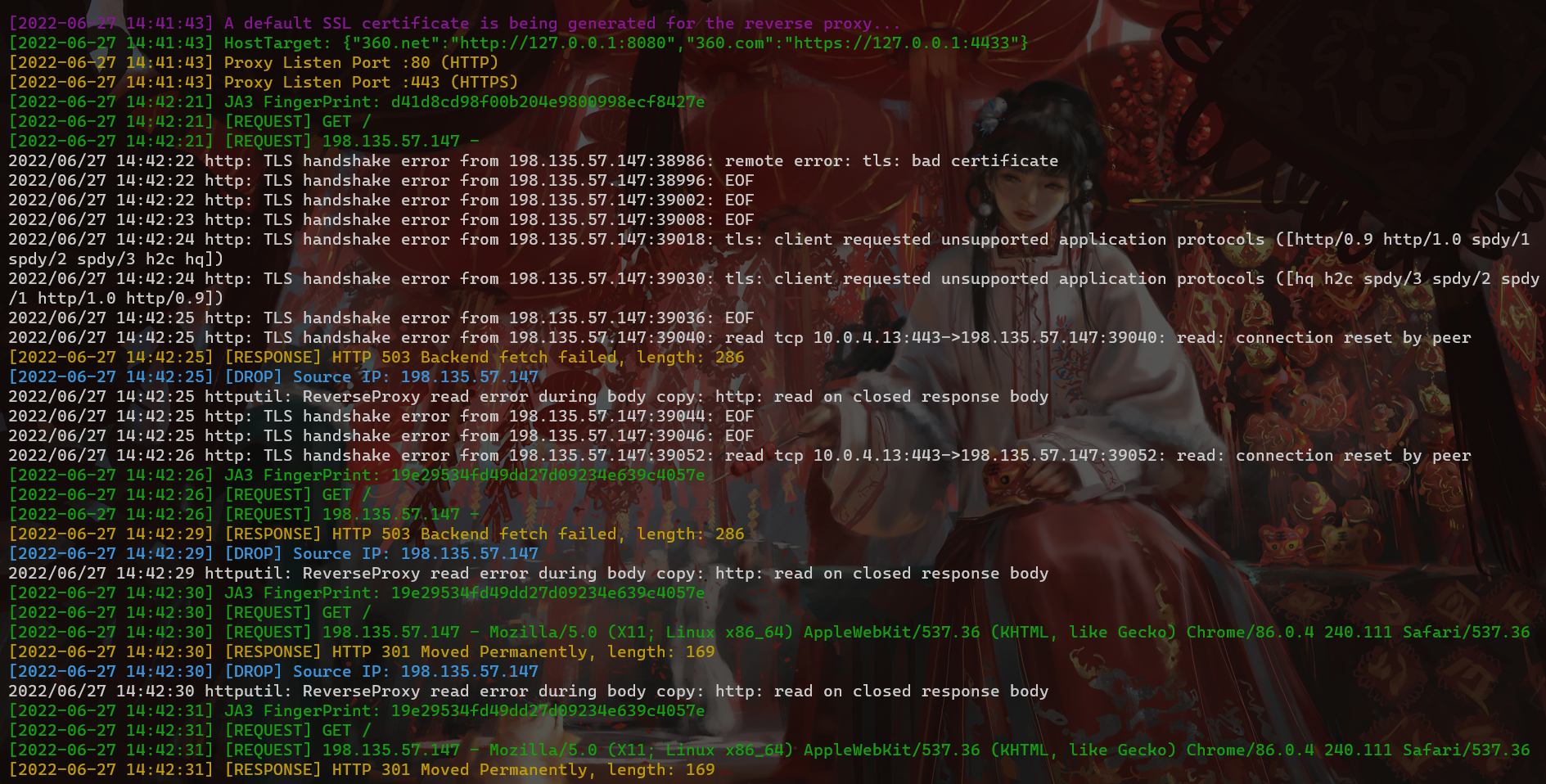
As shown in the figure below, when our interception rule is set to DROP, the spatial mapping system probe will probe the / directory of our reverse proxy port several times. In theory, the request packet sent by mapping is faked as normal traffic as shown. But after several attempts, because the signature of the request packet do not meet the release requirements of RedGuard, they are all responded by Close HTTP. The final effect displayed on the surveying and mapping platform is that the reverse proxy port is not open.
|
||||
|
||||
|
||||
|
||||
The traffic shown in the figure below means that when the interception rule is set to Redirect, we will find that when the mapping probe receives a response, it will continue to scan our directory. UserAgent is random, which seems to be in line with normal traffic requests, but both successfully blocked.
|
||||
The traffic shown in the figure below means that when the interception rule is set to Redirect, we will find that when the mapping probe receives a response, it will continue to scan our directory. User-Agent is random, which seems to be in line with normal traffic requests, but both successfully blocked.
|
||||
|
||||

|
||||
|
||||
@@ -302,11 +358,11 @@ The traffic shown in the figure below means that when the interception rule is s
|
||||
|
||||
## Domain fronting
|
||||
|
||||
RedGuard supports Domain fronting. In my opinion, there are two forms of presentation. One is to use the traditional Domain fronting method, which can be achieved by setting the port of our reverse proxy in the site-wide acceleration back-to-source address. On the original basis, the function of traffic control is added to the domain fronting, and it can be redirected to the specified URL according to the setting we set to make it look more real. It should be noted that the RedGuard setting of the HTTPS HOST header must be consistent with the domain name of the site-wide acceleration.
|
||||
RedGuard supports Domain fronting. In my opinion, there are two forms of presentation. One is to use the traditional Domain fronting method, which can be achieved by setting the port of our reverse proxy in the site-wide acceleration back-to-origin address. On the original basis, the function of traffic control is added to the domain fronting, and it can be redirected to the specified URL according to the setting we set to make it look more real. It should be noted that the RedGuard setting of the HTTPS HOST header must be consistent with the domain name of the site-wide acceleration.
|
||||
|
||||

|
||||
|
||||
In individual combat, I suggest that the above method can be used, and in team tasks, it can also be achieved by self-built "Domain fronting".
|
||||
In single combat, I suggest that the above method can be used, and in team tasks, it can also be achieved by self-built "Domain fronting".
|
||||
|
||||

|
||||
|
||||
@@ -316,15 +372,21 @@ In the self-built Domain fronting, keep multiple reverse proxy ports consistent,
|
||||
|
||||
This can be achieved through multiple node servers, and configure multiple IPs of our nodes in the CS listener HTTPS online IP.
|
||||
|
||||
## Edge Node
|
||||
|
||||
RedGuard 22.08.03 updated the edge host conection settings - custom intranet host interaction domain name, and the edge host uses the domain front CDN node interaction. This makes the information asymmetry between the two hosts, making it more difficult to trace the source and make it difficult to troubleshoot.
|
||||
|
||||

|
||||
|
||||
## CobaltStrike
|
||||
|
||||
If there is a problem with the above method, the actual online C2 server cannot be directly intercepted by the firewall, because the actual load balancing request in the reverse proxy is made by the IP of the cloud server manufacturer.
|
||||
|
||||
If it is a single soldier, we can set an interception strategy on the cloud server firewall.
|
||||
In single combat, we can set an interception rules on the cloud server firewall.
|
||||
|
||||

|
||||
|
||||
Then set the address pointed to by the proxy to https://127.0.0.1:4433.
|
||||
Then set the address pointed to by the proxy to <https://127.0.0.1:4433>.
|
||||
|
||||
```bash
|
||||
{"360.net":"http://127.0.0.1:8080","360.com":"https://127.0.0.1:4433"}
|
||||
@@ -334,7 +396,7 @@ And because our basic verification is based on the HTTP HOST request header, wha
|
||||
|
||||

|
||||
|
||||
For the listener settings, the online port is set to the RedGuard reverse proxy port, and the listening port is the actual online port of the local machine.
|
||||
For the listener settings, the `HTTPS Port (C2)` is set to the RedGuard reverse proxy port, and the `HTTPS Port (Bind)` is the actual connection port of the local machine.
|
||||
|
||||
## Metasploit
|
||||
|
||||
@@ -353,7 +415,7 @@ setg OverrideLPORT 443
|
||||
setg OverrideRequestHost true
|
||||
```
|
||||
|
||||
It is important to note that the `OverrideRequestHost` setting must be set to `true`. This is due to a quirk in the way Metasploit handles incoming HTTP/S requests by default when generating configuration for staging payloads. By default, Metasploit uses the incoming request's `Host` header value (if present) for second-stage configuration instead of the `LHOST` parameter. Therefore, the build stage is configured to send requests directly to your hidden domain name because CloudFront passes your internal domain in the `Host` header of forwarded requests. This is clearly not what we are asking for. Using the `OverrideRequestHost` configuration value, we can force Metasploit to ignore the incoming `Host` header and instead use the `LHOST` configuration value pointing to the origin CloudFront domain.
|
||||
It is important to note that the `OverrideRequestHost` setting must be set to `true`. This is due to a feature in the way Metasploit handles incoming HTTP/S requests by default when generating configuration for staging payloads. By default, Metasploit uses the incoming request's `Host` header value (if present) for second-stage configuration instead of the `LHOST` parameter. Therefore, the build stage is configured to send requests directly to your hidden domain name because CloudFront passes your internal domain in the `Host` header of forwarded requests. This is clearly not what we are asking for. Using the `OverrideRequestHost` configuration value, we can force Metasploit to ignore the incoming `Host` header and instead use the `LHOST` configuration value pointing to the origin CloudFront domain.
|
||||
|
||||
The listener is set to the actual line port that matches the address RedGuard actually forwards to.
|
||||
|
||||
@@ -367,17 +429,33 @@ RedGuard received the request:
|
||||
|
||||
Thank you for your support. RedGuard will continue to improve and update it. I hope that RedGuard can be known to more security practitioners. The tool refers to the design ideas of RedWarden.
|
||||
|
||||
**We welcome everyone to put forward your needs, RedGuard will continue to grow and improve in these needs! **
|
||||
**We welcome everyone to put forward your needs, RedGuard will continue to grow and improve in these needs!**
|
||||
|
||||
**About the developer 风起 related articles:https://www.anquanke.com/member.html?memberId=148652**
|
||||
**About the developer 风起 related articles:<https://www.anquanke.com/member.html?memberId=148652>**
|
||||
|
||||
**Kunyu: https://github.com/knownsec/Kunyu**
|
||||
> 2022Kcon Author of the weapon spectrum of the hacker conference
|
||||
>
|
||||
> The 10th ISC Internet Security Conference Advanced Offensive and Defensive Forum "C2 Front Flow Control" topic
|
||||
>
|
||||
> <https://isc.n.cn/m/pages/live/index?channel_id=iscyY043&ncode=UR6KZ&room_id=1981905&server_id=785016&tab_id=253>
|
||||
>
|
||||
> Exchange C2 traffic based on boundary node links
|
||||
> <https://www.anquanke.com/post/id/278140>
|
||||
>
|
||||
> Analysis of cloud sandbox flow identification technology
|
||||
>
|
||||
> <https://www.anquanke.com/post/id/277431>
|
||||
>
|
||||
> Realization of JARM Fingerprint Randomization Technology
|
||||
>
|
||||
> <https://www.anquanke.com/post/id/276546>
|
||||
|
||||
**Kunyu: <https://github.com/knownsec/Kunyu>**
|
||||
|
||||
> 风起于青萍之末,浪成于微澜之间。
|
||||
|
||||
|
||||
# 0x06 Community
|
||||
|
||||
If you have any questions or requirements, you can submit an issue under the project, or contact the tool author by adding WeCat.
|
||||
If you have any questions or requirements, you can submit an issue under the project, or contact the developer by adding WeChat.
|
||||
|
||||

|
||||
|
||||
+107
-106
@@ -1,106 +1,107 @@
|
||||
/**
|
||||
* @Author 风起
|
||||
* @contact: onlyzaliks@gmail.com
|
||||
* @File: RedGuard.go
|
||||
* @Time: 2022/5/4 10:44
|
||||
**/
|
||||
|
||||
package main
|
||||
|
||||
import (
|
||||
"fmt"
|
||||
"os"
|
||||
"strings"
|
||||
|
||||
"RedGuard/config"
|
||||
"RedGuard/core"
|
||||
"RedGuard/core/parameter"
|
||||
"RedGuard/lib"
|
||||
)
|
||||
|
||||
var logger = lib.Logger() // logger output model
|
||||
|
||||
type C2 struct {
|
||||
Type string //Server interface{}
|
||||
}
|
||||
|
||||
type c2Action interface {
|
||||
serverInit()
|
||||
}
|
||||
|
||||
type cobaltStrike struct {
|
||||
action string
|
||||
}
|
||||
|
||||
// ServerInit CobaltStrike module core method entry
|
||||
func (cs *cobaltStrike) serverInit() {
|
||||
cs.action = "CobaltStrike"
|
||||
var (
|
||||
proxy parameter.ProxyConf // Proxy configuration structure
|
||||
cfg = lib.InitConfig() // config file object
|
||||
num int // counting variable
|
||||
)
|
||||
// HTTPS Reverse proxy SSL certificate is created
|
||||
lib.InitGenerateSelfSignedCert()
|
||||
for key, value := range map[string]string{
|
||||
"HTTPS": "/",
|
||||
"HTTP": "/http",
|
||||
} {
|
||||
proxy.Action = key // Gets the reverse proxy listening port type
|
||||
proxy.Pattern = value // Gets the pattern associated with the listening type
|
||||
proxy.Port = lib.ReadConfig("proxy", fmt.Sprintf("Port_%s", key), cfg)
|
||||
// When num is greater than 0, the main program is called out of the loop
|
||||
if num > 0 {
|
||||
break
|
||||
}
|
||||
num += 1
|
||||
logger.Noticef("HostTarget: %s", lib.ReadConfig("proxy", "HostTarget", cfg))
|
||||
// HTTP reverse proxy
|
||||
go core.ProxyManger(proxy.Action, proxy.Port, proxy.Pattern)
|
||||
}
|
||||
// HTTPS reverse proxy
|
||||
core.ProxyManger(proxy.Action, proxy.Port, proxy.Pattern)
|
||||
// TODO CobaltStrike Core flow control method
|
||||
}
|
||||
|
||||
func (c2 C2) configInit(args *parameter.Parses) {
|
||||
c2.Type = args.C2Type
|
||||
// Check C2 Server type
|
||||
switch strings.ToLower(c2.Type) {
|
||||
case "cobaltstrike":
|
||||
// CobaltStrike Server initialize method
|
||||
(&cobaltStrike{}).serverInit()
|
||||
}
|
||||
// TODO:Development Pending for other C2 frameworks
|
||||
}
|
||||
|
||||
func main() {
|
||||
fmt.Println(fmt.Sprintf(config.BANNER, config.VERSION, config.URL)) // output banner information.
|
||||
// Create the tool argument
|
||||
var (
|
||||
parse parameter.Parses // Basic parameter structure
|
||||
cert parameter.Cert // Certificate configuration parameter structure
|
||||
_proxy parameter.Proxy // Proxy configuration parameter structure
|
||||
)
|
||||
core.CmdParse(&parse, &cert, &_proxy)
|
||||
// Check whether RedGuard has been initialized
|
||||
if num, isExits := lib.CreateConfig(parse.C2Type /* C2 Facility Type */, parse.ConfigPath); isExits {
|
||||
switch {
|
||||
case parse.Update:
|
||||
lib.UpdateConfig(&cert, &_proxy) // Update RedGuard Config
|
||||
logger.Notice("RedGuard Configuration file updated successfully!")
|
||||
case parse.IP != "":
|
||||
if lib.CheckIP(parse.IP) == false {
|
||||
logger.Warning("Please enter a valid IP address")
|
||||
os.Exit(0)
|
||||
}
|
||||
logger.Noticef("Search ipLookUpHelper: %s", parse.IP)
|
||||
core.IPLookUp(parse.Location /* owning place to be verified */, parse.IP) // Query the location of an IP address
|
||||
case num == 0:
|
||||
// Select different C2 Server modes based on user parameters,default CobaltStrike.
|
||||
(C2{}).configInit(&parse)
|
||||
case num == 1: // Initialization is run for the first time
|
||||
os.Exit(0)
|
||||
}
|
||||
}
|
||||
}
|
||||
/**
|
||||
* @Author 风起
|
||||
* @contact: onlyzaliks@gmail.com
|
||||
* @File: RedGuard.go
|
||||
* @Time: 2022/5/4 10:44
|
||||
**/
|
||||
|
||||
package main
|
||||
|
||||
import (
|
||||
"fmt"
|
||||
"os"
|
||||
"strings"
|
||||
|
||||
"RedGuard/config"
|
||||
"RedGuard/core"
|
||||
"RedGuard/core/parameter"
|
||||
"RedGuard/lib"
|
||||
)
|
||||
|
||||
var logger = lib.Logger() // logger output model
|
||||
|
||||
type C2 struct {
|
||||
Type string //Server interface{}
|
||||
}
|
||||
|
||||
type c2Action interface {
|
||||
serverInit()
|
||||
}
|
||||
|
||||
type cobaltStrike struct {
|
||||
action string
|
||||
}
|
||||
|
||||
// ServerInit CobaltStrike module core method entry
|
||||
func (cs *cobaltStrike) serverInit() {
|
||||
cs.action = "CobaltStrike"
|
||||
var (
|
||||
proxy parameter.ProxyConf // Proxy configuration structure
|
||||
cfg = lib.InitConfig() // config file object
|
||||
num int // counting variable
|
||||
)
|
||||
// HTTPS Reverse proxy SSL certificate is created
|
||||
lib.InitGenerateSelfSignedCert()
|
||||
for key, value := range map[string]string{
|
||||
"HTTPS": "/",
|
||||
"HTTP": "/http",
|
||||
} {
|
||||
proxy.Action = key // Gets the reverse proxy listening port type
|
||||
proxy.Pattern = value // Gets the pattern associated with the listening type
|
||||
proxy.Port = lib.ReadConfig("proxy", fmt.Sprintf("Port_%s", key), cfg)
|
||||
// When num is greater than 0, the main program is called out of the loop
|
||||
if num > 0 {
|
||||
break
|
||||
}
|
||||
num += 1
|
||||
logger.Noticef("HostTarget: %s", lib.ReadConfig("proxy", "HostTarget", cfg))
|
||||
// HTTP reverse proxy
|
||||
go core.ProxyManger(proxy.Action, proxy.Port, proxy.Pattern)
|
||||
}
|
||||
// HTTPS reverse proxy
|
||||
core.ProxyManger(proxy.Action, proxy.Port, proxy.Pattern)
|
||||
// TODO CobaltStrike Core flow control method
|
||||
}
|
||||
|
||||
func (c2 C2) configInit(args *parameter.Parses) {
|
||||
c2.Type = args.C2Type
|
||||
// Check C2 Server type
|
||||
switch strings.ToLower(c2.Type) {
|
||||
case "cobaltstrike":
|
||||
// CobaltStrike Server initialize method
|
||||
(&cobaltStrike{}).serverInit()
|
||||
}
|
||||
// TODO:Development Pending for other C2 frameworks
|
||||
}
|
||||
|
||||
func main() {
|
||||
fmt.Println(fmt.Sprintf(config.BANNER, config.VERSION, config.URL)) // output banner information.
|
||||
// Create the tool argument
|
||||
var (
|
||||
parse parameter.Parses // Basic parameter structure
|
||||
_cert parameter.Cert // Certificate configuration parameter structure
|
||||
_proxy parameter.Proxy // Proxy configuration parameter structure
|
||||
_finger parameter.SampleFinger
|
||||
)
|
||||
core.CmdParse(&parse, &_cert, &_finger, &_proxy)
|
||||
// Check whether RedGuard has been initialized
|
||||
if num, isExits := lib.CreateConfig(parse.C2Type /* C2 Facility Type */, parse.ConfigPath); isExits {
|
||||
switch {
|
||||
case parse.Update:
|
||||
lib.UpdateConfig(&_cert, &_proxy, &_finger) // Update RedGuard Config
|
||||
logger.Notice("RedGuard Configuration file updated successfully!")
|
||||
case parse.IP != "":
|
||||
if lib.CheckIP(parse.IP) == false {
|
||||
logger.Warning("Please enter a valid IP address")
|
||||
os.Exit(0)
|
||||
}
|
||||
logger.Noticef("Search ipLookUpHelper: %s", parse.IP)
|
||||
core.IPLookUp(parse.Location /* owning place to be verified */, parse.IP) // Query the location of an IP address
|
||||
case num == 0:
|
||||
// Select different C2 Server modes based on user parameters,default CobaltStrike.
|
||||
(C2{}).configInit(&parse)
|
||||
case num == 1: // Initialization is run for the first time
|
||||
os.Exit(0)
|
||||
}
|
||||
}
|
||||
}
|
||||
|
||||
+6
-228
@@ -3,8 +3,8 @@
|
||||
[2022-05-23 10:34:36] [RedGuard/core.ProxyManger] Proxy Listen Port :80 (HTTP)
|
||||
[2022-05-23 10:34:36] [RedGuard/core.ProxyManger] Proxy Listen Port :443 (HTTPS)
|
||||
[2022-05-23 10:34:57] [RedGuard/core.(*baseHandle).ServeHTTP] [REQUEST] GET /
|
||||
[2022-05-23 10:34:57] [RedGuard/core.(*baseHandle).ServeHTTP] [REQUEST] 111.14.218.206 - Mozilla/5.0 (Windows NT 10.0; Win64; x64) AppleWebKit/537.36 (KHTML, like Gecko) Chrome/101.0.4951.64 Safari/537.36 Edg/101.0.1210.53
|
||||
[2022-05-23 10:34:57] [RedGuard/core.(*baseHandle).ServeHTTP] [REDIRECT] Source IP: 111.14.218.206 -> Destination Site: https://360.net
|
||||
[2022-05-23 10:34:57] [RedGuard/core.(*baseHandle).ServeHTTP] [REQUEST] 111.14.218.xxx - Mozilla/5.0 (Windows NT 10.0; Win64; x64) AppleWebKit/537.36 (KHTML, like Gecko) Chrome/101.0.4951.64 Safari/537.36 Edg/101.0.1210.53
|
||||
[2022-05-23 10:34:57] [RedGuard/core.(*baseHandle).ServeHTTP] [REDIRECT] Source IP: 111.14.218.xxx -> Destination Site: https://360.net
|
||||
[2022-05-23 10:35:52] [RedGuard/core.(*baseHandle).ServeHTTP] [REQUEST] GET /
|
||||
[2022-05-23 10:35:52] [RedGuard/core.IPLookUp] {
|
||||
"status": "0",
|
||||
@@ -13,13 +13,13 @@
|
||||
"data": [
|
||||
{
|
||||
"ExtendedLocation": "",
|
||||
"OriginQuery": "111.14.218.206",
|
||||
"OriginQuery": "111.14.218.xxx",
|
||||
"appinfo": "",
|
||||
"disp_type": 0,
|
||||
"fetchkey": "111.14.218.206",
|
||||
"fetchkey": "111.14.218.xxx",
|
||||
"location": "山东省济南市 移动",
|
||||
"origip": "111.14.218.206",
|
||||
"origipquery": "111.14.218.206",
|
||||
"origipquery": "111.14.218.xxx",
|
||||
"resourceid": "6006",
|
||||
"role_id": 0,
|
||||
"shareImage": 1,
|
||||
@@ -316,226 +316,4 @@
|
||||
[2022-05-30 17:33:19] [RedGuard/core.(*baseHandle).ServeHTTP] [REQUEST] GET /js/config.js
|
||||
[2022-05-30 17:33:19] [RedGuard/core.(*baseHandle).ServeHTTP] [REQUEST] 127.0.0.1 - Mozilla/5.0 (Windows NT 10.0; Win64; x64) AppleWebKit/53L, like Gecko) Chrome/90.0.4430.212 Safari/537.36
|
||||
[2022-05-30 17:33:19] [RedGuard/core.modifyResponse.func1.1] [RESPONSE] HTTP 301 Moved Permanently, length: 169
|
||||
[2022-05-30 17:33:20] [RedGuard/core.modifyResponse.func1.1] [REDIRECT] Source IP: 127.0.0.1 -> Destination Site: https://360.net
|
||||
[2022-05-30 17:34:42] [RedGuard/lib.InitGenerateSelfSignedCert] A default SSL certificate is being generated for the reverse proxy...
|
||||
[2022-05-30 17:34:42] [main.(*cobaltStrike).serverInit] HostTarget: {"360.net":"http://127.0.0.1:8080","360.com":"https://47.94.170.143:4433/"}
|
||||
[2022-05-30 17:34:42] [RedGuard/core.ProxyManger] Proxy Listen Port :80 (HTTP)
|
||||
[2022-05-30 17:34:42] [RedGuard/core.ProxyManger] Proxy Listen Port :443 (HTTPS)
|
||||
[2022-05-30 17:34:48] [RedGuard/core.(*baseHandle).ServeHTTP] [REQUEST] GET /js/config.js
|
||||
[2022-05-30 17:34:48] [RedGuard/core.(*baseHandle).ServeHTTP] [REQUEST] 127.0.0.1 - Mozilla/5.0 (Windows NT 10.0; Win64; x64) AppleWebKit/53L, like Gecko) Chrome/90.0.4430.212 Safari/537.36
|
||||
[2022-05-30 17:34:48] [RedGuard/core.modifyResponse.func1.1] [RESPONSE] HTTP 404 Not Found, length: 271
|
||||
[2022-05-30 17:34:48] [RedGuard/core.modifyResponse.func1.1] [REDIRECT] Source IP: 127.0.0.1 -> Destination Site: https://360.net
|
||||
[2022-05-30 17:34:57] [RedGuard/lib.InitGenerateSelfSignedCert] A default SSL certificate is being generated for the reverse proxy...
|
||||
[2022-05-30 17:34:57] [main.(*cobaltStrike).serverInit] HostTarget: {"360.net":"http://127.0.0.1:8080","360.com":"https://47.94.170.143:4433/"}
|
||||
[2022-05-30 17:34:57] [RedGuard/core.ProxyManger] Proxy Listen Port :80 (HTTP)
|
||||
[2022-05-30 17:34:57] [RedGuard/core.ProxyManger] Proxy Listen Port :443 (HTTPS)
|
||||
[2022-05-30 17:35:00] [RedGuard/core.(*baseHandle).ServeHTTP] [REQUEST] GET /
|
||||
[2022-05-30 17:35:00] [RedGuard/core.(*baseHandle).ServeHTTP] [REQUEST] 127.0.0.1 - Mozilla/5.0 (Windows NT 10.0; Win64; x64) AppleWebKit/53L, like Gecko) Chrome/90.0.4430.212 Safari/537.36
|
||||
[2022-05-30 17:35:00] [RedGuard/core.modifyResponse.func1.1] [RESPONSE] HTTP 200 OK, length: 546
|
||||
[2022-05-30 17:35:00] [RedGuard/core.modifyResponse.func1.1] [REDIRECT] Source IP: 127.0.0.1 -> Destination Site: https://360.net
|
||||
[2022-05-30 17:41:36] [RedGuard/lib.InitGenerateSelfSignedCert] A default SSL certificate is being generated for the reverse proxy...
|
||||
[2022-05-30 17:41:36] [main.(*cobaltStrike).serverInit] HostTarget: {"360.net":"http://127.0.0.1:8080","360.com":"https://47.94.170.143:4433/"}
|
||||
[2022-05-30 17:41:36] [RedGuard/core.ProxyManger] Proxy Listen Port :443 (HTTPS)
|
||||
[2022-05-30 17:41:36] [RedGuard/core.ProxyManger] Proxy Listen Port :80 (HTTP)
|
||||
[2022-05-30 17:41:37] [RedGuard/core.(*baseHandle).ServeHTTP] [JA3] Hash: 3590d1b8f63dd1d590f0adea4227443d
|
||||
[2022-05-30 17:41:37] [RedGuard/core.(*baseHandle).ServeHTTP] [REQUEST] GET /
|
||||
[2022-05-30 17:41:37] [RedGuard/core.(*baseHandle).ServeHTTP] [REQUEST] 127.0.0.1 - Mozilla/5.0 (Windows NT 10.0; Win64; x64) AppleWebKit/53L, like Gecko) Chrome/90.0.4430.212 Safari/537.36
|
||||
[2022-05-30 17:41:37] [RedGuard/core.modifyResponse.func1.1] [RESPONSE] HTTP 200 OK, length: 546
|
||||
[2022-05-30 17:41:37] [RedGuard/core.modifyResponse.func1.1] [REDIRECT] Source IP: 127.0.0.1 -> Destination Site: https://360.net
|
||||
[2022-05-30 17:42:06] [RedGuard/lib.InitGenerateSelfSignedCert] A default SSL certificate is being generated for the reverse proxy...
|
||||
[2022-05-30 17:42:06] [main.(*cobaltStrike).serverInit] HostTarget: {"360.net":"http://127.0.0.1:8080","360.com":"https://47.94.170.143:4433/"}
|
||||
[2022-05-30 17:42:06] [RedGuard/core.ProxyManger] Proxy Listen Port :80 (HTTP)
|
||||
[2022-05-30 17:42:06] [RedGuard/core.ProxyManger] Proxy Listen Port :443 (HTTPS)
|
||||
[2022-05-30 17:42:08] [RedGuard/core.(*baseHandle).ServeHTTP] JA3 FingerPrint: 3590d1b8f63dd1d590f0adea4227443d
|
||||
[2022-05-30 17:42:08] [RedGuard/core.(*baseHandle).ServeHTTP] [REQUEST] GET /
|
||||
[2022-05-30 17:42:08] [RedGuard/core.(*baseHandle).ServeHTTP] [REQUEST] 127.0.0.1 - Mozilla/5.0 (Windows NT 10.0; Win64; x64) AppleWebKit/53L, like Gecko) Chrome/90.0.4430.212 Safari/537.36
|
||||
[2022-05-30 17:42:08] [RedGuard/core.modifyResponse.func1.1] [RESPONSE] HTTP 200 OK, length: 546
|
||||
[2022-05-30 17:42:08] [RedGuard/core.modifyResponse.func1.1] [REDIRECT] Source IP: 127.0.0.1 -> Destination Site: https://360.net
|
||||
[2022-05-30 17:42:23] [RedGuard/lib.InitGenerateSelfSignedCert] A default SSL certificate is being generated for the reverse proxy...
|
||||
[2022-05-30 17:42:23] [main.(*cobaltStrike).serverInit] HostTarget: {"360.net":"http://127.0.0.1:8080","360.com":"https://47.94.170.143:4433/"}
|
||||
[2022-05-30 17:42:23] [RedGuard/core.ProxyManger] Proxy Listen Port :80 (HTTP)
|
||||
[2022-05-30 17:42:23] [RedGuard/core.ProxyManger] Proxy Listen Port :443 (HTTPS)
|
||||
[2022-05-30 17:42:24] [RedGuard/core.(*baseHandle).ServeHTTP] JA3 FingerPrint: 3590d1b8f63dd1d590f0adea4227443d
|
||||
[2022-05-30 17:42:24] [RedGuard/core.(*baseHandle).ServeHTTP] [REQUEST] GET /
|
||||
[2022-05-30 17:42:24] [RedGuard/core.(*baseHandle).ServeHTTP] [REQUEST] 127.0.0.1 - Mozilla/5.0 (Windows NT 10.0; Win64; x64) AppleWebKit/53L, like Gecko) Chrome/90.0.4430.212 Safari/537.36
|
||||
[2022-05-30 17:42:24] [RedGuard/core.modifyResponse.func1.1] [RESPONSE] HTTP 200 OK, length: 546
|
||||
[2022-05-30 17:42:24] [RedGuard/core.modifyResponse.func1.1] [REDIRECT] Source IP: 127.0.0.1 -> Destination Site: https://360.net
|
||||
[2022-05-31 14:20:49] [RedGuard/lib.InitGenerateSelfSignedCert] A default SSL certificate is being generated for the reverse proxy...
|
||||
[2022-05-31 14:20:49] [main.(*cobaltStrike).serverInit] HostTarget: {"360.net":"http://127.0.0.1:8080","360.com":"https://47.94.170.143:4433/"}
|
||||
[2022-05-31 14:20:49] [RedGuard/core.ProxyManger] Proxy Listen Port :80 (HTTP)
|
||||
[2022-05-31 14:20:49] [RedGuard/core.ProxyManger] Proxy Listen Port :443 (HTTPS)
|
||||
[2022-05-31 14:21:32] [RedGuard/core.(*baseHandle).ServeHTTP] JA3 FingerPrint: 3590d1b8f63dd1d590f0adea4227443d
|
||||
[2022-05-31 14:21:32] [RedGuard/core.(*baseHandle).ServeHTTP] [REQUEST] GET /
|
||||
[2022-05-31 14:21:32] [RedGuard/core.(*baseHandle).ServeHTTP] [REQUEST] 127.0.0.1 - Mozilla/5.0 (Windows NT 10.0; Win64; x64) AppleWebKit/53L, like Gecko) Chrome/90.0.4430.212 Safari/537.36
|
||||
[2022-05-31 14:21:32] [RedGuard/core.modifyResponse.func1.1] [RESPONSE] HTTP 301 Moved Permanently, length: 169
|
||||
[2022-05-31 14:21:32] [RedGuard/core.(*baseHandle).ServeHTTP] [REDIRECT] Source IP: 127.0.0.1 -> Destination Site: https://360.net
|
||||
[2022-05-31 14:21:41] [RedGuard/lib.InitGenerateSelfSignedCert] A default SSL certificate is being generated for the reverse proxy...
|
||||
[2022-05-31 14:21:41] [main.(*cobaltStrike).serverInit] HostTarget: {"360.net":"http://127.0.0.1:8080","360.com":"https://47.94.170.143:4433/"}
|
||||
[2022-05-31 14:21:41] [RedGuard/core.ProxyManger] Proxy Listen Port :443 (HTTPS)
|
||||
[2022-05-31 14:21:41] [RedGuard/core.ProxyManger] Proxy Listen Port :80 (HTTP)
|
||||
[2022-05-31 14:21:59] [RedGuard/core.(*baseHandle).ServeHTTP] JA3 FingerPrint: 3590d1b8f63dd1d590f0adea4227443d
|
||||
[2022-05-31 14:21:59] [RedGuard/core.(*baseHandle).ServeHTTP] [REQUEST] GET /
|
||||
[2022-05-31 14:21:59] [RedGuard/core.(*baseHandle).ServeHTTP] [REQUEST] 127.0.0.1 - Mozilla/5.0 (Windows NT 10.0; Win64; x64) AppleWebKit/53L, like Gecko) Chrome/90.0.4430.212 Safari/537.36
|
||||
[2022-05-31 14:21:59] [RedGuard/core.modifyResponse.func1.1] [RESPONSE] HTTP 200 OK, length: 546
|
||||
[2022-05-31 14:22:31] [RedGuard/core.(*baseHandle).ServeHTTP] JA3 FingerPrint: 3590d1b8f63dd1d590f0adea4227443d
|
||||
[2022-05-31 14:22:31] [RedGuard/core.(*baseHandle).ServeHTTP] [REQUEST] GET /
|
||||
[2022-05-31 14:22:31] [RedGuard/core.(*baseHandle).ServeHTTP] [REQUEST] 127.0.0.1 - Mozilla/5.0 (Windows NT 10.0; Win64; x64) AppleWebKit/53L, like Gecko) Chrome/90.0.4430.212 Safari/537.36
|
||||
[2022-05-31 14:22:31] [RedGuard/core.modifyResponse.func1.1] [RESPONSE] HTTP 301 Moved Permanently, length: 169
|
||||
[2022-05-31 14:22:31] [RedGuard/core.(*baseHandle).ServeHTTP] [REDIRECT] Source IP: 127.0.0.1 -> Destination Site: https://360.net
|
||||
[2022-05-31 14:23:42] [RedGuard/lib.InitGenerateSelfSignedCert] A default SSL certificate is being generated for the reverse proxy...
|
||||
[2022-05-31 14:23:42] [main.(*cobaltStrike).serverInit] HostTarget: {"360.net":"http://127.0.0.1:8080","360.com":"https://47.94.170.143:4433/"}
|
||||
[2022-05-31 14:23:42] [RedGuard/core.ProxyManger] Proxy Listen Port :80 (HTTP)
|
||||
[2022-05-31 14:23:42] [RedGuard/core.ProxyManger] Proxy Listen Port :443 (HTTPS)
|
||||
[2022-05-31 14:23:43] [RedGuard/core.(*baseHandle).ServeHTTP] JA3 FingerPrint: 3590d1b8f63dd1d590f0adea4227443d
|
||||
[2022-05-31 14:23:43] [RedGuard/core.(*baseHandle).ServeHTTP] [REQUEST] GET /
|
||||
[2022-05-31 14:23:43] [RedGuard/core.(*baseHandle).ServeHTTP] [REQUEST] 127.0.0.1 - Mozilla/5.0 (Windows NT 10.0; Win64; x64) AppleWebKit/53L, like Gecko) Chrome/90.0.4430.212 Safari/537.36
|
||||
[2022-05-31 14:23:44] [RedGuard/core.modifyResponse.func1.1] [RESPONSE] HTTP 301 Moved Permanently, length: 169
|
||||
[2022-05-31 14:23:44] [RedGuard/core.modifyResponse.func1.1] [DROP] Source IP: 127.0.0.1
|
||||
[2022-05-31 14:24:40] [RedGuard/lib.InitGenerateSelfSignedCert] A default SSL certificate is being generated for the reverse proxy...
|
||||
[2022-05-31 14:24:40] [main.(*cobaltStrike).serverInit] HostTarget: {"360.net":"http://127.0.0.1:8080","360.com":"https://47.94.170.143:4433/"}
|
||||
[2022-05-31 14:24:40] [RedGuard/core.ProxyManger] Proxy Listen Port :80 (HTTP)
|
||||
[2022-05-31 14:24:40] [RedGuard/core.ProxyManger] Proxy Listen Port :443 (HTTPS)
|
||||
[2022-05-31 14:24:41] [RedGuard/core.(*baseHandle).ServeHTTP] JA3 FingerPrint: 3590d1b8f63dd1d590f0adea4227443d
|
||||
[2022-05-31 14:24:41] [RedGuard/core.(*baseHandle).ServeHTTP] [REQUEST] GET /
|
||||
[2022-05-31 14:24:41] [RedGuard/core.(*baseHandle).ServeHTTP] [REQUEST] 127.0.0.1 - Mozilla/5.0 (Windows NT 10.0; Win64; x64) AppleWebKit/53L, like Gecko) Chrome/90.0.4430.212 Safari/537.36
|
||||
[2022-05-31 14:24:41] [RedGuard/core.modifyResponse.func1.1] [RESPONSE] HTTP 301 Moved Permanently, length: 169
|
||||
[2022-05-31 14:24:41] [RedGuard/core.modifyResponse.func1.1] [DROP] Source IP: 127.0.0.1
|
||||
[2022-05-31 14:25:02] [RedGuard/core.(*baseHandle).ServeHTTP] JA3 FingerPrint: 3590d1b8f63dd1d590f0adea4227443d
|
||||
[2022-05-31 14:25:02] [RedGuard/core.(*baseHandle).ServeHTTP] [REQUEST] GET /
|
||||
[2022-05-31 14:25:02] [RedGuard/core.(*baseHandle).ServeHTTP] [REQUEST] 127.0.0.1 - Mozilla/5.0 (Windows NT 10.0; Win64; x64) AppleWebKit/53L, like Gecko) Chrome/90.0.4430.212 Safari/537.36
|
||||
[2022-05-31 14:25:02] [RedGuard/core.modifyResponse.func1.1] [RESPONSE] HTTP 200 OK, length: 546
|
||||
[2022-05-31 14:26:57] [RedGuard/lib.InitGenerateSelfSignedCert] A default SSL certificate is being generated for the reverse proxy...
|
||||
[2022-05-31 14:26:57] [main.(*cobaltStrike).serverInit] HostTarget: {"360.net":"http://127.0.0.1:8080","360.com":"https://47.94.170.143:4433/"}
|
||||
[2022-05-31 14:26:57] [RedGuard/core.ProxyManger] Proxy Listen Port :443 (HTTPS)
|
||||
[2022-05-31 14:26:57] [RedGuard/core.ProxyManger] Proxy Listen Port :80 (HTTP)
|
||||
[2022-05-31 14:27:00] [RedGuard/core.(*baseHandle).ServeHTTP] JA3 FingerPrint: 3590d1b8f63dd1d590f0adea4227443d
|
||||
[2022-05-31 14:27:00] [RedGuard/core.(*baseHandle).ServeHTTP] [REQUEST] GET /
|
||||
[2022-05-31 14:27:00] [RedGuard/core.(*baseHandle).ServeHTTP] [REQUEST] 127.0.0.1 - Mozilla/5.0 (Windows NT 10.0; Win64; x64) AppleWebKit/53L, like Gecko) Chrome/90.0.4430.212 Safari/537.36
|
||||
[2022-05-31 14:27:00] [RedGuard/core.modifyResponse.func1.1] [RESPONSE] HTTP 200 OK, length: 546
|
||||
[2022-05-31 14:27:26] [RedGuard/lib.InitGenerateSelfSignedCert] A default SSL certificate is being generated for the reverse proxy...
|
||||
[2022-05-31 14:27:26] [main.(*cobaltStrike).serverInit] HostTarget: {"360.net":"http://127.0.0.1:8080","360.com":"https://47.94.170.143:4433/"}
|
||||
[2022-05-31 14:27:26] [RedGuard/core.ProxyManger] Proxy Listen Port :80 (HTTP)
|
||||
[2022-05-31 14:27:26] [RedGuard/core.ProxyManger] Proxy Listen Port :443 (HTTPS)
|
||||
[2022-05-31 14:27:28] [RedGuard/core.(*baseHandle).ServeHTTP] JA3 FingerPrint: 3590d1b8f63dd1d590f0adea4227443d
|
||||
[2022-05-31 14:27:28] [RedGuard/core.(*baseHandle).ServeHTTP] [REQUEST] GET /
|
||||
[2022-05-31 14:27:28] [RedGuard/core.(*baseHandle).ServeHTTP] [REQUEST] 127.0.0.1 - Mozilla/5.0 (Windows NT 10.0; Win64; x64) AppleWebKit/53L, like Gecko) Chrome/90.0.4430.212 Safari/537.36
|
||||
[2022-05-31 14:27:28] [RedGuard/core.modifyResponse.func1.1] [RESPONSE] HTTP 200 OK, length: 546
|
||||
[2022-06-01 15:36:04] [RedGuard/lib.InitGenerateSelfSignedCert] A default SSL certificate is being generated for the reverse proxy...
|
||||
[2022-06-01 15:36:04] [main.(*cobaltStrike).serverInit] HostTarget: {"360.net":"http://127.0.0.1:8080","360.com":"https://47.94.170.143:4433/"}
|
||||
[2022-06-01 15:36:04] [RedGuard/core.ProxyManger] Proxy Listen Port :80 (HTTP)
|
||||
[2022-06-01 15:36:04] [RedGuard/core.ProxyManger] Proxy Listen Port :443 (HTTPS)
|
||||
[2022-06-01 15:36:11] [RedGuard/core.(*baseHandle).ServeHTTP] JA3 FingerPrint: 68a2a6353c17dc14caf39d4996d1661c
|
||||
[2022-06-01 15:36:11] [RedGuard/core.(*baseHandle).ServeHTTP] [REQUEST] GET /
|
||||
[2022-06-01 15:36:11] [RedGuard/core.(*baseHandle).ServeHTTP] [REQUEST] 127.0.0.1 - Mozilla/5.0 (Windows NT 10.0; Win64; x64) AppleWebKit/537.36 (KHTML, like Gecko) Chrome/102.0.5005.63 Safari/537.36
|
||||
[2022-06-01 15:36:11] [RedGuard/core.modifyResponse.func1.1] [RESPONSE] HTTP 404 Not Found, length: 0
|
||||
[2022-06-01 15:36:11] [RedGuard/core.modifyResponse.func1.1] [DROP] Source IP: 127.0.0.1
|
||||
[2022-06-01 15:36:11] [RedGuard/core.(*baseHandle).ServeHTTP] [REDIRECT] Source IP: 127.0.0.1 -> Destination Site: https://cloud.tencent.com/
|
||||
[2022-06-01 15:36:12] [RedGuard/core.(*baseHandle).ServeHTTP] JA3 FingerPrint: 68a2a6353c17dc14caf39d4996d1661c
|
||||
[2022-06-01 15:36:12] [RedGuard/core.(*baseHandle).ServeHTTP] [REQUEST] GET /
|
||||
[2022-06-01 15:36:12] [RedGuard/core.(*baseHandle).ServeHTTP] [REQUEST] 127.0.0.1 - Mozilla/5.0 (Windows NT 10.0; Win64; x64) AppleWebKit/537.36 (KHTML, like Gecko) Chrome/102.0.5005.63 Safari/537.36
|
||||
[2022-06-01 15:36:12] [RedGuard/core.modifyResponse.func1.1] [RESPONSE] HTTP 404 Not Found, length: 0
|
||||
[2022-06-01 15:36:12] [RedGuard/core.modifyResponse.func1.1] [DROP] Source IP: 127.0.0.1
|
||||
[2022-06-01 15:36:12] [RedGuard/core.(*baseHandle).ServeHTTP] [REDIRECT] Source IP: 127.0.0.1 -> Destination Site: https://cloud.tencent.com/
|
||||
[2022-06-01 15:36:13] [RedGuard/core.(*baseHandle).ServeHTTP] JA3 FingerPrint: 68a2a6353c17dc14caf39d4996d1661c
|
||||
[2022-06-01 15:36:13] [RedGuard/core.(*baseHandle).ServeHTTP] [REQUEST] GET /
|
||||
[2022-06-01 15:36:13] [RedGuard/core.(*baseHandle).ServeHTTP] [REQUEST] 127.0.0.1 - Mozilla/5.0 (Windows NT 10.0; Win64; x64) AppleWebKit/537.36 (KHTML, like Gecko) Chrome/102.0.5005.63 Safari/537.36
|
||||
[2022-06-01 15:36:13] [RedGuard/core.modifyResponse.func1.1] [RESPONSE] HTTP 404 Not Found, length: 0
|
||||
[2022-06-01 15:36:13] [RedGuard/core.modifyResponse.func1.1] [DROP] Source IP: 127.0.0.1
|
||||
[2022-06-01 15:36:13] [RedGuard/core.(*baseHandle).ServeHTTP] [REDIRECT] Source IP: 127.0.0.1 -> Destination Site: https://cloud.tencent.com/
|
||||
[2022-06-01 15:36:13] [RedGuard/core.(*baseHandle).ServeHTTP] JA3 FingerPrint: 68a2a6353c17dc14caf39d4996d1661c
|
||||
[2022-06-01 15:36:13] [RedGuard/core.(*baseHandle).ServeHTTP] [REQUEST] GET /
|
||||
[2022-06-01 15:36:13] [RedGuard/core.(*baseHandle).ServeHTTP] [REQUEST] 127.0.0.1 - Mozilla/5.0 (Windows NT 10.0; Win64; x64) AppleWebKit/537.36 (KHTML, like Gecko) Chrome/102.0.5005.63 Safari/537.36
|
||||
[2022-06-01 15:36:13] [RedGuard/core.modifyResponse.func1.1] [RESPONSE] HTTP 404 Not Found, length: 0
|
||||
[2022-06-01 15:36:13] [RedGuard/core.modifyResponse.func1.1] [DROP] Source IP: 127.0.0.1
|
||||
[2022-06-01 15:36:13] [RedGuard/core.(*baseHandle).ServeHTTP] [REDIRECT] Source IP: 127.0.0.1 -> Destination Site: https://cloud.tencent.com/
|
||||
[2022-06-01 15:36:14] [RedGuard/core.(*baseHandle).ServeHTTP] JA3 FingerPrint: 68a2a6353c17dc14caf39d4996d1661c
|
||||
[2022-06-01 15:36:14] [RedGuard/core.(*baseHandle).ServeHTTP] [REQUEST] GET /
|
||||
[2022-06-01 15:36:14] [RedGuard/core.(*baseHandle).ServeHTTP] [REQUEST] 127.0.0.1 - Mozilla/5.0 (Windows NT 10.0; Win64; x64) AppleWebKit/537.36 (KHTML, like Gecko) Chrome/102.0.5005.63 Safari/537.36
|
||||
[2022-06-01 15:36:14] [RedGuard/core.modifyResponse.func1.1] [RESPONSE] HTTP 404 Not Found, length: 0
|
||||
[2022-06-01 15:36:14] [RedGuard/core.modifyResponse.func1.1] [DROP] Source IP: 127.0.0.1
|
||||
[2022-06-01 15:36:14] [RedGuard/core.(*baseHandle).ServeHTTP] [REDIRECT] Source IP: 127.0.0.1 -> Destination Site: https://cloud.tencent.com/
|
||||
[2022-06-01 15:36:24] [RedGuard/core.(*baseHandle).ServeHTTP] JA3 FingerPrint: 68a2a6353c17dc14caf39d4996d1661c
|
||||
[2022-06-01 15:36:24] [RedGuard/core.(*baseHandle).ServeHTTP] [REQUEST] GET /
|
||||
[2022-06-01 15:36:24] [RedGuard/core.(*baseHandle).ServeHTTP] [REQUEST] 127.0.0.1 - Mozilla/5.0 (Windows NT 10.0; Win64; x64) AppleWebKit/537.36 (KHTML, like Gecko) Chrome/102.0.5005.63 Safari/537.36
|
||||
[2022-06-01 15:36:24] [RedGuard/core.modifyResponse.func1.1] [RESPONSE] HTTP 301 Moved Permanently, length: 161
|
||||
[2022-06-01 15:36:24] [RedGuard/core.modifyResponse.func1.1] [DROP] Source IP: 127.0.0.1
|
||||
[2022-06-01 15:36:24] [RedGuard/core.(*baseHandle).ServeHTTP] JA3 FingerPrint: dfa1a04d7a3940d1792725df93f81719
|
||||
[2022-06-01 15:36:24] [RedGuard/core.(*baseHandle).ServeHTTP] [REQUEST] GET /
|
||||
[2022-06-01 15:36:24] [RedGuard/core.(*baseHandle).ServeHTTP] [REQUEST] 127.0.0.1 - Mozilla/5.0 (Windows NT 10.0; Win64; x64) AppleWebKit/537.36 (KHTML, like Gecko) Chrome/102.0.5005.63 Safari/537.36
|
||||
[2022-06-01 15:36:24] [RedGuard/core.modifyResponse.func1.1] [RESPONSE] HTTP 301 Moved Permanently, length: 161
|
||||
[2022-06-01 15:36:24] [RedGuard/core.modifyResponse.func1.1] [DROP] Source IP: 127.0.0.1
|
||||
[2022-06-01 15:36:25] [RedGuard/core.(*baseHandle).ServeHTTP] JA3 FingerPrint: 1b550bbdde0f6511638eb52cd2ef9787
|
||||
[2022-06-01 15:36:25] [RedGuard/core.(*baseHandle).ServeHTTP] [REQUEST] GET /
|
||||
[2022-06-01 15:36:25] [RedGuard/core.(*baseHandle).ServeHTTP] [REQUEST] 127.0.0.1 - Mozilla/5.0 (Windows NT 10.0; Win64; x64) AppleWebKit/537.36 (KHTML, like Gecko) Chrome/102.0.5005.63 Safari/537.36
|
||||
[2022-06-01 15:36:25] [RedGuard/core.(*baseHandle).ServeHTTP] [REDIRECT] Source IP: 127.0.0.1 -> Destination Site: https://tencent.com/
|
||||
[2022-06-01 15:36:25] [RedGuard/core.(*baseHandle).ServeHTTP] JA3 FingerPrint: c0fc8d2a3090cfd5c5a4d6a027c0d9ee
|
||||
[2022-06-01 15:36:25] [RedGuard/core.(*baseHandle).ServeHTTP] [REQUEST] GET /
|
||||
[2022-06-01 15:36:25] [RedGuard/core.(*baseHandle).ServeHTTP] [REQUEST] 127.0.0.1 - Mozilla/5.0 (Windows NT 10.0; Win64; x64) AppleWebKit/537.36 (KHTML, like Gecko) Chrome/102.0.5005.63 Safari/537.36
|
||||
[2022-06-01 15:36:25] [RedGuard/core.modifyResponse.func1.1] [RESPONSE] HTTP 301 Moved Permanently, length: 161
|
||||
[2022-06-01 15:36:25] [RedGuard/core.modifyResponse.func1.1] [DROP] Source IP: 127.0.0.1
|
||||
[2022-06-01 15:36:26] [RedGuard/core.(*baseHandle).ServeHTTP] JA3 FingerPrint: c21234fe03e9149213ede6ecf6333853
|
||||
[2022-06-01 15:36:26] [RedGuard/core.(*baseHandle).ServeHTTP] [REQUEST] GET /
|
||||
[2022-06-01 15:36:26] [RedGuard/core.(*baseHandle).ServeHTTP] [REQUEST] 127.0.0.1 - Mozilla/5.0 (Windows NT 10.0; Win64; x64) AppleWebKit/537.36 (KHTML, like Gecko) Chrome/102.0.5005.63 Safari/537.36
|
||||
[2022-06-01 15:36:26] [RedGuard/core.modifyResponse.func1.1] [RESPONSE] HTTP 301 Moved Permanently, length: 161
|
||||
[2022-06-01 15:36:26] [RedGuard/core.modifyResponse.func1.1] [DROP] Source IP: 127.0.0.1
|
||||
[2022-06-01 15:36:26] [RedGuard/core.(*baseHandle).ServeHTTP] JA3 FingerPrint: 9d92b5b69ad7e3ba6732b092276f2a40
|
||||
[2022-06-01 15:36:26] [RedGuard/core.(*baseHandle).ServeHTTP] [REQUEST] GET /
|
||||
[2022-06-01 15:36:26] [RedGuard/core.(*baseHandle).ServeHTTP] [REQUEST] 127.0.0.1 - Mozilla/5.0 (Windows NT 10.0; Win64; x64) AppleWebKit/537.36 (KHTML, like Gecko) Chrome/102.0.5005.63 Safari/537.36
|
||||
[2022-06-01 15:36:26] [RedGuard/core.modifyResponse.func1.1] [RESPONSE] HTTP 301 Moved Permanently, length: 161
|
||||
[2022-06-01 15:36:26] [RedGuard/core.modifyResponse.func1.1] [DROP] Source IP: 127.0.0.1
|
||||
[2022-06-01 15:36:52] [RedGuard/core.(*baseHandle).ServeHTTP] JA3 FingerPrint: a1cf9cd9cf6ecfd42459643454d3d409
|
||||
[2022-06-01 15:36:52] [RedGuard/core.(*baseHandle).ServeHTTP] [REQUEST] GET /
|
||||
[2022-06-01 15:36:52] [RedGuard/core.(*baseHandle).ServeHTTP] [REQUEST] 127.0.0.1 - Mozilla/5.0 (Windows NT 10.0; Win64; x64) AppleWebKit/537.36 (KHTML, like Gecko) Chrome/102.0.5005.63 Safari/537.36
|
||||
[2022-06-01 15:36:53] [RedGuard/core.modifyResponse.func1.1] [RESPONSE] HTTP 301 Moved Permanently, length: 169
|
||||
[2022-06-01 15:36:53] [RedGuard/core.modifyResponse.func1.1] [DROP] Source IP: 127.0.0.1
|
||||
[2022-06-01 15:36:54] [RedGuard/core.(*baseHandle).ServeHTTP] JA3 FingerPrint: 0294d48ead6646ccd3446c0d79b953d4
|
||||
[2022-06-01 15:36:54] [RedGuard/core.(*baseHandle).ServeHTTP] [REQUEST] GET /
|
||||
[2022-06-01 15:36:54] [RedGuard/core.(*baseHandle).ServeHTTP] [REQUEST] 127.0.0.1 - Mozilla/5.0 (Windows NT 10.0; Win64; x64) AppleWebKit/537.36 (KHTML, like Gecko) Chrome/102.0.5005.63 Safari/537.36
|
||||
[2022-06-01 15:36:54] [RedGuard/core.modifyResponse.func1.1] [RESPONSE] HTTP 301 Moved Permanently, length: 169
|
||||
[2022-06-01 15:36:54] [RedGuard/core.modifyResponse.func1.1] [DROP] Source IP: 127.0.0.1
|
||||
[2022-06-01 15:36:55] [RedGuard/core.(*baseHandle).ServeHTTP] JA3 FingerPrint: b9ddaf9bf0f00f86749f6e8b83b759ec
|
||||
[2022-06-01 15:36:55] [RedGuard/core.(*baseHandle).ServeHTTP] [REQUEST] GET /
|
||||
[2022-06-01 15:36:55] [RedGuard/core.(*baseHandle).ServeHTTP] [REQUEST] 127.0.0.1 - Mozilla/5.0 (Windows NT 10.0; Win64; x64) AppleWebKit/537.36 (KHTML, like Gecko) Chrome/102.0.5005.63 Safari/537.36
|
||||
[2022-06-01 15:36:55] [RedGuard/core.modifyResponse.func1.1] [RESPONSE] HTTP 301 Moved Permanently, length: 169
|
||||
[2022-06-01 15:36:55] [RedGuard/core.modifyResponse.func1.1] [DROP] Source IP: 127.0.0.1
|
||||
[2022-06-01 15:36:55] [RedGuard/core.(*baseHandle).ServeHTTP] JA3 FingerPrint: ab6c50ef473b76a2aaf48bd06d20f8e1
|
||||
[2022-06-01 15:36:55] [RedGuard/core.(*baseHandle).ServeHTTP] [REQUEST] GET /
|
||||
[2022-06-01 15:36:55] [RedGuard/core.(*baseHandle).ServeHTTP] [REQUEST] 127.0.0.1 - Mozilla/5.0 (Windows NT 10.0; Win64; x64) AppleWebKit/537.36 (KHTML, like Gecko) Chrome/102.0.5005.63 Safari/537.36
|
||||
[2022-06-01 15:36:55] [RedGuard/core.modifyResponse.func1.1] [RESPONSE] HTTP 301 Moved Permanently, length: 169
|
||||
[2022-06-01 15:36:55] [RedGuard/core.modifyResponse.func1.1] [DROP] Source IP: 127.0.0.1
|
||||
[2022-06-01 15:37:00] [RedGuard/core.(*baseHandle).ServeHTTP] JA3 FingerPrint: 34bab37e854f9e9afb68e9a98bef9c81
|
||||
[2022-06-01 15:37:00] [RedGuard/core.(*baseHandle).ServeHTTP] [REQUEST] GET /
|
||||
[2022-06-01 15:37:00] [RedGuard/core.(*baseHandle).ServeHTTP] [REQUEST] 127.0.0.1 - Mozilla/5.0 (Windows NT 10.0; Win64; x64) AppleWebKit/537.36 (KHTML, like Gecko) Chrome/102.0.5005.63 Safari/537.36
|
||||
[2022-06-01 15:37:01] [RedGuard/core.modifyResponse.func1.1] [RESPONSE] HTTP 301 Moved Permanently, length: 169
|
||||
[2022-06-01 15:37:01] [RedGuard/core.modifyResponse.func1.1] [DROP] Source IP: 127.0.0.1
|
||||
[2022-06-01 15:37:12] [RedGuard/core.(*baseHandle).ServeHTTP] JA3 FingerPrint: 0bc598b11dd90ca04efaf1442167fc24
|
||||
[2022-06-01 15:37:12] [RedGuard/core.(*baseHandle).ServeHTTP] [REQUEST] GET /
|
||||
[2022-06-01 15:37:12] [RedGuard/core.(*baseHandle).ServeHTTP] [REQUEST] 127.0.0.1 - Mozilla/5.0 (Windows NT 10.0; Win64; x64) AppleWebKit/537.36 (KHTML, like Gecko) Chrome/102.0.5005.63 Safari/537.36
|
||||
[2022-06-01 15:37:12] [RedGuard/core.modifyResponse.func1.1] [RESPONSE] HTTP 301 Moved Permanently, length: 161
|
||||
[2022-06-01 15:37:12] [RedGuard/core.(*baseHandle).ServeHTTP] [REDIRECT] Source IP: 127.0.0.1 -> Destination Site: https://tencent.com/
|
||||
[2022-06-01 15:37:28] [RedGuard/core.(*baseHandle).ServeHTTP] JA3 FingerPrint: 0bc598b11dd90ca04efaf1442167fc24
|
||||
[2022-06-01 15:37:28] [RedGuard/core.(*baseHandle).ServeHTTP] [REQUEST] GET /
|
||||
[2022-06-01 15:37:28] [RedGuard/core.(*baseHandle).ServeHTTP] [REQUEST] 127.0.0.1 - Mozilla/5.0 (Windows NT 10.0; Win64; x64) AppleWebKit/537.36 (KHTML, like Gecko) Chrome/102.0.5005.63 Safari/537.36
|
||||
[2022-06-01 15:37:28] [RedGuard/core.modifyResponse.func1.1] [RESPONSE] HTTP 404 Not Found, length: 0
|
||||
[2022-06-01 15:37:28] [RedGuard/core.(*baseHandle).ServeHTTP] [REDIRECT] Source IP: 127.0.0.1 -> Destination Site: https://yun.tencent.com
|
||||
[2022-06-01 15:37:30] [RedGuard/core.(*baseHandle).ServeHTTP] JA3 FingerPrint: 0bc598b11dd90ca04efaf1442167fc24
|
||||
[2022-06-01 15:37:30] [RedGuard/core.(*baseHandle).ServeHTTP] [REQUEST] GET /
|
||||
[2022-06-01 15:37:30] [RedGuard/core.(*baseHandle).ServeHTTP] [REQUEST] 127.0.0.1 - Mozilla/5.0 (Windows NT 10.0; Win64; x64) AppleWebKit/537.36 (KHTML, like Gecko) Chrome/102.0.5005.63 Safari/537.36
|
||||
[2022-06-01 15:37:30] [RedGuard/core.modifyResponse.func1.1] [RESPONSE] HTTP 404 Not Found, length: 0
|
||||
[2022-06-01 15:37:30] [RedGuard/core.(*baseHandle).ServeHTTP] [REDIRECT] Source IP: 127.0.0.1 -> Destination Site: https://yun.tencent.com
|
||||
[2022-06-01 15:37:40] [RedGuard/core.(*baseHandle).ServeHTTP] JA3 FingerPrint: 0bc598b11dd90ca04efaf1442167fc24
|
||||
[2022-06-01 15:37:40] [RedGuard/core.(*baseHandle).ServeHTTP] [REQUEST] GET /
|
||||
[2022-06-01 15:37:40] [RedGuard/core.(*baseHandle).ServeHTTP] [REQUEST] 127.0.0.1 - Mozilla/5.0 (Windows NT 10.0; Win64; x64) AppleWebKit/537.36 (KHTML, like Gecko) Chrome/102.0.5005.63 Safari/537.36
|
||||
[2022-06-01 15:37:40] [RedGuard/core.modifyResponse.func1.1] [RESPONSE] HTTP 404 Not Found, length: 0
|
||||
[2022-06-01 15:37:40] [RedGuard/core.(*baseHandle).ServeHTTP] [REDIRECT] Source IP: 127.0.0.1 -> Destination Site: https://cloud.tencent.com/
|
||||
[2022-06-01 15:37:40] [RedGuard/core.(*baseHandle).ServeHTTP] JA3 FingerPrint: 0bc598b11dd90ca04efaf1442167fc24
|
||||
[2022-06-01 15:37:40] [RedGuard/core.(*baseHandle).ServeHTTP] [REQUEST] GET /
|
||||
[2022-06-01 15:37:41] [RedGuard/core.(*baseHandle).ServeHTTP] [REQUEST] 127.0.0.1 - Mozilla/5.0 (Windows NT 10.0; Win64; x64) AppleWebKit/537.36 (KHTML, like Gecko) Chrome/102.0.5005.63 Safari/537.36
|
||||
[2022-06-01 15:37:41] [RedGuard/core.modifyResponse.func1.1] [RESPONSE] HTTP 404 Not Found, length: 0
|
||||
[2022-06-01 15:37:41] [RedGuard/core.(*baseHandle).ServeHTTP] [REDIRECT] Source IP: 127.0.0.1 -> Destination Site: https://cloud.tencent.com/
|
||||
[2022-06-01 15:37:41] [RedGuard/core.(*baseHandle).ServeHTTP] JA3 FingerPrint: 0bc598b11dd90ca04efaf1442167fc24
|
||||
[2022-06-01 15:37:41] [RedGuard/core.(*baseHandle).ServeHTTP] [REQUEST] GET /
|
||||
[2022-06-01 15:37:41] [RedGuard/core.(*baseHandle).ServeHTTP] [REQUEST] 127.0.0.1 - Mozilla/5.0 (Windows NT 10.0; Win64; x64) AppleWebKit/537.36 (KHTML, like Gecko) Chrome/102.0.5005.63 Safari/537.36
|
||||
[2022-06-01 15:37:41] [RedGuard/core.modifyResponse.func1.1] [RESPONSE] HTTP 404 Not Found, length: 0
|
||||
[2022-06-01 15:37:41] [RedGuard/core.(*baseHandle).ServeHTTP] [REDIRECT] Source IP: 127.0.0.1 -> Destination Site: https://cloud.tencent.com/
|
||||
[2
|
||||
[2022-05-30 17:33:20] [RedGuard/core.modifyResponse.func1.1] [REDIRECT] Source IP: 127.0.0.1 -> Destination Site: https://360.net
|
||||
@@ -1,37 +1,47 @@
|
||||
package config
|
||||
|
||||
var RedGuardConfig = `[cert]
|
||||
# User Optional name
|
||||
DNSName = *.aliyun.com,manager.channel.aliyun.com,*.acs-internal.aliyuncs.com,*.connect.aliyun.com,aliyun.com,whois.www.net.cn,tianchi-global.com
|
||||
# Cert User CommonName
|
||||
CommonName = *.aliyun.com
|
||||
# Cert User Locality
|
||||
Locality = HangZhou
|
||||
# Cert User Organization
|
||||
Organization = Alibaba (China) Technology Co., Ltd.
|
||||
# Cert User Country
|
||||
Country = CN
|
||||
# Whether to use the certificate you have applied for true/false
|
||||
HasCert = true
|
||||
|
||||
[proxy]
|
||||
# key : Header Host value of the reverse proxy
|
||||
# value : The actual address forwarded by the reverse proxy
|
||||
HostTarget = {"360.net":"http://127.0.0.1:8080","360.com":"https://127.0.0.1:4433"}
|
||||
# HTTPS Reverse proxy port
|
||||
Port_HTTPS = :443
|
||||
# HTTP Reverse proxy port
|
||||
Port_HTTP = :80
|
||||
# RedGuard interception action: redirect / reset / proxy (Hijack HTTP Response)
|
||||
drop_action = proxy
|
||||
# URL to redirect to
|
||||
Redirect = https://360.net
|
||||
# IP address owning restrictions example:AllowLocation = 山东,上海,杭州 or shanghai,beijing
|
||||
AllowLocation = *
|
||||
# Whitelist list example: AllowIP = 172.16.1.1,192.168.1.1
|
||||
AllowIP = *
|
||||
# Limit the time of requests example: AllowTime = 8:00 - 16:00
|
||||
AllowTime = *
|
||||
# C2 Malleable File Path
|
||||
MalleableFile = *
|
||||
`
|
||||
package config
|
||||
|
||||
var RedGuardConfig = `[cert]
|
||||
# User Optional name
|
||||
DNSName = *.aliyun.com,manager.channel.aliyun.com,*.acs-internal.aliyuncs.com",*.connect.aliyun.com,aliyun.com,whois.www.net.cn,tianchi-global.com
|
||||
# Cert User CommonName
|
||||
CommonName = *.aliyun.com
|
||||
# Cert User Locality
|
||||
Locality = HangZhou
|
||||
# Cert User Organization
|
||||
Organization = Alibaba (China) Technology Co., Ltd.
|
||||
# Cert User Country
|
||||
Country = CN
|
||||
# Whether to use the certificate you have applied for true/false
|
||||
HasCert = true
|
||||
|
||||
[proxy]
|
||||
# key : Header Host value of the reverse proxy
|
||||
# value : The actual address forwarded by the reverse proxy
|
||||
HostTarget = {"360.net":"http://127.0.0.1:8080","360.com":"https://127.0.0.1:4433"}
|
||||
# HTTPS Reverse proxy port
|
||||
Port_HTTPS = :443
|
||||
# HTTP Reverse proxy port
|
||||
Port_HTTP = :80
|
||||
# RedGuard interception action: redirect / reset / proxy (Hijack HTTP Response)
|
||||
drop_action = redirect
|
||||
# URL to redirect to
|
||||
Redirect = https://360.net
|
||||
# IP address owning restrictions example:AllowLocation = 山东,上海,杭州 or shanghai,beijing
|
||||
AllowLocation = *
|
||||
# Whitelist list example: AllowIP = 172.16.1.1,192.168.1.1
|
||||
AllowIP = *
|
||||
# Limit the time of requests example: AllowTime = 8:00 - 16:00
|
||||
AllowTime = *
|
||||
# C2 Malleable File Path
|
||||
MalleableFile = *
|
||||
# Edge Host Communication Domain
|
||||
EdgeHost = *
|
||||
# Edge Host Proxy Target example: EdgeTarget = 360.com
|
||||
EdgeTarget = *
|
||||
|
||||
[SampleFinger]
|
||||
# HTTP Request Header Field
|
||||
FieldName = *
|
||||
# Sample Finger example:xxxxxx,xxxxxx
|
||||
FieldFinger = *
|
||||
`
|
||||
|
||||
+31
-31
@@ -1,31 +1,31 @@
|
||||
/**
|
||||
* @Author 风起
|
||||
* @contact: onlyzaliks@gmail.com
|
||||
* @File: version.go
|
||||
* @Time: 2022/5/5 9:25
|
||||
**/
|
||||
|
||||
package config
|
||||
|
||||
const (
|
||||
BANNER = `
|
||||
|
||||
██████╗ ███████╗██████╗ ██████╗ ██╗ ██╗ █████╗ ██████╗ ██████╗
|
||||
██╔══██╗██╔════╝██╔══██╗ ██╔════╝ ██║ ██║██╔══██╗██╔══██╗██╔══██╗
|
||||
██████╔╝█████╗ ██║ ██║ ██║ ███╗██║ ██║███████║██████╔╝██║ ██║
|
||||
██╔══██╗██╔══╝ ██║ ██║ ██║ ██║██║ ██║██╔══██║██╔══██╗██║ ██║
|
||||
██║ ██║███████╗██████╔╝ ╚██████╔╝╚██████╔╝██║ ██║██║ ██║██████╔╝ -V %s
|
||||
╚═╝ ╚═╝╚══════╝╚═════╝ ╚═════╝ ╚═════╝ ╚═╝ ╚═╝╚═╝ ╚═╝╚═════╝
|
||||
|
||||
Github:%s
|
||||
|
||||
RedGuard is a C2 front flow control tool,Can avoid Blue Teams,AVs,EDRs check.
|
||||
`
|
||||
VERSION = "22.7.21 Alpha"
|
||||
TITLE = "RedGuard"
|
||||
LICENSE = "GPL-2.0"
|
||||
URL = "https://github.com/wikiZ/RedGuard"
|
||||
AUTHOR = "风起"
|
||||
TEAM = "0/00"
|
||||
COPYRIGHT = "Copyright (C) 2022 风起. All Rights Reserved"
|
||||
)
|
||||
/**
|
||||
* @Author 风起
|
||||
* @contact: onlyzaliks@gmail.com
|
||||
* @File: version.go
|
||||
* @Time: 2022/5/5 9:25
|
||||
**/
|
||||
|
||||
package config
|
||||
|
||||
const (
|
||||
BANNER = `
|
||||
|
||||
██████╗ ███████╗██████╗ ██████╗ ██╗ ██╗ █████╗ ██████╗ ██████╗
|
||||
██╔══██╗██╔════╝██╔══██╗ ██╔════╝ ██║ ██║██╔══██╗██╔══██╗██╔══██╗
|
||||
██████╔╝█████╗ ██║ ██║ ██║ ███╗██║ ██║███████║██████╔╝██║ ██║
|
||||
██╔══██╗██╔══╝ ██║ ██║ ██║ ██║██║ ██║██╔══██║██╔══██╗██║ ██║
|
||||
██║ ██║███████╗██████╔╝ ╚██████╔╝╚██████╔╝██║ ██║██║ ██║██████╔╝ -V %s
|
||||
╚═╝ ╚═╝╚══════╝╚═════╝ ╚═════╝ ╚═════╝ ╚═╝ ╚═╝╚═╝ ╚═╝╚═════╝
|
||||
|
||||
Github:%s
|
||||
|
||||
RedGuard is a C2 front flow control tool,Can avoid Blue Teams,AVs,EDRs check.
|
||||
`
|
||||
VERSION = "23.05.13 Alpha"
|
||||
TITLE = "RedGuard"
|
||||
LICENSE = "GPL-2.0"
|
||||
URL = "https://github.com/wikiZ/RedGuard"
|
||||
AUTHOR = "风起"
|
||||
TEAM = "0/00"
|
||||
COPYRIGHT = "Copyright (C) 2022 风起. All Rights Reserved"
|
||||
)
|
||||
|
||||
@@ -119,9 +119,22 @@ func ProxyFilterManger(req *http.Request) (status bool) {
|
||||
allowIP = lib.ReadConfig("proxy", "AllowIP", cfg) // Obtain the online IP address whitelist
|
||||
allowTime = lib.ReadConfig("proxy", "AllowTime", cfg) // Gets the allowed online time in the configuration file
|
||||
malleableFile = lib.ReadConfig("proxy", "MalleableFile", cfg) // Obtain the profile path
|
||||
fieldName = lib.ReadConfig("SampleFinger", "FieldName", cfg)
|
||||
fieldFinger = lib.ReadConfig("SampleFinger", "FieldFinger", cfg)
|
||||
banJA3 = data.BANJA3
|
||||
banIP = data.BANIP
|
||||
)
|
||||
|
||||
// sample finger verify
|
||||
if f := req.Header.Get(fieldName); fieldName != "*" && fieldFinger != "*" && f != "" {
|
||||
finger := lib.EncodeMD5(req.Header.Get("Host") + f)
|
||||
logger.Noticef("Sample Finger: %s", finger)
|
||||
if strings.Contains(fieldFinger, finger) /* finger Check*/ {
|
||||
logger.Errorf("[DROP] Requested Sample Finger is forbidden to access")
|
||||
return false
|
||||
}
|
||||
}
|
||||
|
||||
// Check whether ban ip is matched
|
||||
for _, banAddr := range strings.Split(banIP, "\n") {
|
||||
// Check whether the requested IP address is in the correct IP address format or network segment format
|
||||
|
||||
+204
-194
@@ -1,194 +1,204 @@
|
||||
/**
|
||||
* @Author 风起
|
||||
* @contact: onlyzaliks@gmail.com
|
||||
* @File: ProxyHandler.go
|
||||
* @Time: 2022/5/5 16:53
|
||||
**/
|
||||
|
||||
package core
|
||||
|
||||
import (
|
||||
"io"
|
||||
"math/rand"
|
||||
"net/url"
|
||||
"strconv"
|
||||
"strings"
|
||||
"sync"
|
||||
"time"
|
||||
|
||||
"RedGuard/lib"
|
||||
|
||||
"github.com/sleeyax/ja3rp/crypto/tls"
|
||||
"github.com/sleeyax/ja3rp/net/http"
|
||||
"github.com/sleeyax/ja3rp/net/http/httputil"
|
||||
"github.com/wxnacy/wgo/arrays"
|
||||
)
|
||||
|
||||
var (
|
||||
ip string // HTTP remote IP
|
||||
redirectURL string // Proxy redirect URL
|
||||
_addressArray []string // By request list
|
||||
_startUp sync.Mutex // mutex lock
|
||||
_hostProxy = make(map[string]*httputil.ReverseProxy) // Used to cache httputil.ReverseProxy
|
||||
)
|
||||
|
||||
type baseHandle struct{}
|
||||
|
||||
func NewProxy(proxyURL string, dropType bool) (*httputil.ReverseProxy, error) {
|
||||
destinationURL, err := url.Parse(proxyURL)
|
||||
if err != nil {
|
||||
return nil, err
|
||||
}
|
||||
proxy := httputil.NewSingleHostReverseProxy(destinationURL)
|
||||
// dropType Check whether the response to the request is changed
|
||||
proxy.ModifyResponse = modifyResponse(dropType) // Modifies the response to the request
|
||||
return proxy, nil
|
||||
}
|
||||
|
||||
func modifyResponse(drop bool) func(*http.Response) error {
|
||||
return func(resp *http.Response) error {
|
||||
defer func(Body io.ReadCloser) {
|
||||
logger.Warningf("[RESPONSE] HTTP %s, length: %d", resp.Status, resp.ContentLength)
|
||||
if drop {
|
||||
// DROP Request
|
||||
logger.Alertf("[DROP] Source IP: %s", resp.Request.RemoteAddr)
|
||||
_ = Body.Close() // Direct shutdown response
|
||||
return
|
||||
}
|
||||
}(resp.Body)
|
||||
return nil
|
||||
}
|
||||
}
|
||||
|
||||
// ProxyRequestHandler A reverse proxy processes HTTP requests
|
||||
func (h *baseHandle) ServeHTTP(write http.ResponseWriter, req *http.Request) {
|
||||
var (
|
||||
host = &req.Host
|
||||
cfg = lib.InitConfig() // config file object
|
||||
// Obtain the domain name and target map
|
||||
hostTarget = lib.JsonToMap(lib.ReadConfig(
|
||||
"proxy",
|
||||
"HostTarget",
|
||||
cfg),
|
||||
)
|
||||
// Read the configuration file to check whether DROP is enabled
|
||||
dropAction = lib.ReadConfig("proxy", "drop_action", cfg)
|
||||
// IP address of the host that initiates the request
|
||||
)
|
||||
var isDrop bool
|
||||
var proxy *httputil.ReverseProxy
|
||||
// Determine the URL to be redirected to
|
||||
redirectURL = lib.ReadConfig("proxy", "Redirect", cfg)
|
||||
req.RemoteAddr = lib.ConvertIP(req.RemoteAddr)
|
||||
// Obtaining the real IP address
|
||||
if req.Header.Get("X-Forwarded-For") != "" {
|
||||
req.RemoteAddr = req.Header.Get("X-Forwarded-For")
|
||||
}
|
||||
// Set the forwarding header XFF so that C2 obtains the online real IP address
|
||||
req.Header.Set("X-Forwarded-For", req.RemoteAddr)
|
||||
// Check whether the host is verified
|
||||
if IPHash := lib.EncodeMD5(req.JA3); arrays.ContainsString(_addressArray, req.JA3) == -1 {
|
||||
logger.Noticef("JA3 FingerPrint: %s", IPHash)
|
||||
logger.Noticef("[REQUEST] %s %s", req.Method, req.RequestURI)
|
||||
// Request filtering method
|
||||
if !ProxyFilterManger(req) {
|
||||
goto LOOK // Redirect to the specified site
|
||||
}
|
||||
logger.Noticef("[REQUEST] %s - %s", req.RemoteAddr, req.UserAgent())
|
||||
_addressArray = append(_addressArray, IPHash) // Add to the list after verification for the first time
|
||||
}
|
||||
// Fetch directly from cache
|
||||
if fn, ok := _hostProxy[*host]; ok {
|
||||
fn.ServeHTTP(write, req)
|
||||
return
|
||||
}
|
||||
// Check whether the domain name is in the whitelist
|
||||
if target, ok := hostTarget[*host]; ok {
|
||||
proxy, err := NewProxy(target, false)
|
||||
if err != nil {
|
||||
logger.Error("Proxy Exception")
|
||||
}
|
||||
_hostProxy[*host] = proxy // Into the cache
|
||||
proxy.ServeHTTP(write, req)
|
||||
return
|
||||
}
|
||||
|
||||
LOOK:
|
||||
req.URL.Path = "/" // Url rewriting
|
||||
// condition is not met, the element is removed from the slice
|
||||
// Output The URL of each request for this IP address
|
||||
if len(_addressArray) > 0 {
|
||||
_addressArray = _addressArray[:len(_addressArray)-1]
|
||||
}
|
||||
// dropAction Select the reverse proxy interception mode
|
||||
switch dropAction {
|
||||
// redirect
|
||||
case "redirect":
|
||||
http.Redirect(write, req, redirectURL, http.StatusTemporaryRedirect)
|
||||
goto REDIRECT
|
||||
// reset Turning off the HTTP response
|
||||
case "reset":
|
||||
isDrop = true
|
||||
// proxy Hijacking target requests response information
|
||||
case "proxy":
|
||||
break
|
||||
}
|
||||
// Determine whether to redirect or intercept intercepted traffic
|
||||
proxy, _ = NewProxy(redirectURL, isDrop)
|
||||
// Unauthorized access is redirected to the specified URL
|
||||
proxy.ServeHTTP(write, req)
|
||||
REDIRECT:
|
||||
// REDIRECT Request
|
||||
logger.Alertf("[%s] Source IP: %s -> Destination Site: %s", strings.ToUpper(dropAction), req.RemoteAddr, redirectURL)
|
||||
}
|
||||
|
||||
// ProxyManger Initialize the reverse proxy and pass in the address of the real back-end service
|
||||
// handle all requests to your server using the proxy
|
||||
// @param action string reverse proxy listening port type
|
||||
// @param port string reverse proxy listening port
|
||||
// @param pattern string pattern associated with the listening port type
|
||||
func ProxyManger(action, port, pattern string) {
|
||||
var (
|
||||
handle = &baseHandle{}
|
||||
config = &tls.Config{} // Example Initialize TLS config
|
||||
_isHasCert, _ = strconv.ParseBool(lib.ReadConfig("cert", "HasCert", lib.InitConfig()))
|
||||
)
|
||||
_startUp.Lock() // 我知道这可能是一个bug哈哈哈,但是它可能不影响什么,就不修了。
|
||||
http.Handle(pattern, handle)
|
||||
// Cancels the validity verification of the destination TLS certificate
|
||||
http.DefaultTransport.(*http.Transport).TLSClientConfig = &tls.Config{
|
||||
InsecureSkipVerify: true,
|
||||
}
|
||||
// Disable client connection caching to connection pools
|
||||
http.DefaultTransport.(*http.Transport).DisableKeepAlives = true
|
||||
rand.Seed(time.Now().UnixNano())
|
||||
if !_isHasCert {
|
||||
config = &tls.Config{
|
||||
// JARM FingerPrint Random
|
||||
CipherSuites: lib.MicsSlice([]uint16{
|
||||
0x0005, 0x000a, 0x002f,
|
||||
0x0035, 0x003c, 0x009c,
|
||||
0x009d, 0xc011, 0xc012,
|
||||
0xc013, 0xc014, 0xc027,
|
||||
0xc02f, 0xc030, 0xcca8,
|
||||
}, rand.Intn(2)+1),
|
||||
}
|
||||
}
|
||||
server := &http.Server{
|
||||
Addr: port, // proxy port
|
||||
Handler: handle, // Cache structure
|
||||
TLSConfig: config, // TLS Server Config
|
||||
TLSNextProto: make(map[string]func(*http.Server, *tls.Conn, http.Handler), 1),
|
||||
}
|
||||
logger.Warningf("Proxy Listen Port %s (%s)", port, action)
|
||||
_startUp.Unlock()
|
||||
if action == "HTTPS" {
|
||||
// HTTPS reverse proxy
|
||||
_ = server.ListenAndServeTLS(
|
||||
"cert-rsa/ca.crt", // rsa cert crt
|
||||
"cert-rsa/ca.key", // rsa cert key
|
||||
)
|
||||
} else {
|
||||
_ = server.ListenAndServe() // HTTP reverse proxy
|
||||
}
|
||||
}
|
||||
/**
|
||||
* @Author 风起
|
||||
* @contact: onlyzaliks@gmail.com
|
||||
* @File: ProxyHandler.go
|
||||
* @Time: 2022/5/5 16:53
|
||||
**/
|
||||
|
||||
package core
|
||||
|
||||
import (
|
||||
"io"
|
||||
"math/rand"
|
||||
"net/url"
|
||||
"strconv"
|
||||
"strings"
|
||||
"sync"
|
||||
"time"
|
||||
|
||||
"RedGuard/lib"
|
||||
|
||||
"github.com/sleeyax/ja3rp/crypto/tls"
|
||||
"github.com/sleeyax/ja3rp/net/http"
|
||||
"github.com/sleeyax/ja3rp/net/http/httputil"
|
||||
"github.com/wxnacy/wgo/arrays"
|
||||
)
|
||||
|
||||
var (
|
||||
ip string // HTTP remote IP
|
||||
redirectURL string // Proxy redirect URL
|
||||
_addressArray []string // By request list
|
||||
_startUp sync.Mutex // mutex lock
|
||||
_hostProxy = make(map[string]*httputil.ReverseProxy) // Used to cache httputil.ReverseProxy
|
||||
)
|
||||
|
||||
type baseHandle struct{}
|
||||
|
||||
func NewProxy(proxyURL string, dropType bool) (*httputil.ReverseProxy, error) {
|
||||
destinationURL, err := url.Parse(proxyURL)
|
||||
if err != nil {
|
||||
return nil, err
|
||||
}
|
||||
proxy := httputil.NewSingleHostReverseProxy(destinationURL)
|
||||
// dropType Check whether the response to the request is changed
|
||||
proxy.ModifyResponse = modifyResponse(dropType) // Modifies the response to the request
|
||||
return proxy, nil
|
||||
}
|
||||
|
||||
func modifyResponse(drop bool) func(*http.Response) error {
|
||||
return func(resp *http.Response) error {
|
||||
defer func(Body io.ReadCloser) {
|
||||
logger.Warningf("[RESPONSE] HTTP %s, length: %d", resp.Status, resp.ContentLength)
|
||||
if drop {
|
||||
// DROP Request
|
||||
logger.Alertf("[DROP] Source IP: %s", resp.Request.RemoteAddr)
|
||||
_ = Body.Close() // Direct shutdown response
|
||||
return
|
||||
}
|
||||
}(resp.Body)
|
||||
return nil
|
||||
}
|
||||
}
|
||||
|
||||
// ProxyRequestHandler A reverse proxy processes HTTP requests
|
||||
func (h *baseHandle) ServeHTTP(write http.ResponseWriter, req *http.Request) {
|
||||
var (
|
||||
host = &req.Host
|
||||
cfg = lib.InitConfig() // config file object
|
||||
// Obtain the domain name and target map
|
||||
hostTarget = lib.JsonToMap(lib.ReadConfig(
|
||||
"proxy",
|
||||
"HostTarget",
|
||||
cfg),
|
||||
)
|
||||
// Read the configuration file to check whether DROP is enabled
|
||||
dropAction = lib.ReadConfig("proxy", "drop_action", cfg)
|
||||
// Read the Edge Host Communication Domain
|
||||
edgeHost = lib.ReadConfig("proxy", "EdgeHost", cfg)
|
||||
// Read the Edge Host Proxy Target
|
||||
edgeTarget = lib.ReadConfig("proxy", "EdgeTarget", cfg)
|
||||
)
|
||||
var isDrop bool
|
||||
var proxy *httputil.ReverseProxy
|
||||
req.RemoteAddr = lib.ConvertIP(req.RemoteAddr)
|
||||
// Determine the URL to be redirected to
|
||||
redirectURL = lib.ReadConfig("proxy", "Redirect", cfg)
|
||||
// Obtaining the real IP address
|
||||
if req.Header.Get("X-Forwarded-For") != "" {
|
||||
req.RemoteAddr = req.Header.Get("X-Forwarded-For")
|
||||
}
|
||||
// Check whether Edge HOST Domain is enabled
|
||||
if edgeHost != "*" && edgeTarget != "*" && edgeHost != "" && edgeTarget != "" {
|
||||
// Replace request HOST
|
||||
hostTarget[edgeHost], req.Host = hostTarget[*host], edgeHost
|
||||
delete(hostTarget, edgeTarget)
|
||||
}
|
||||
// Set the forwarding header XFF so that C2 obtains the online real IP address
|
||||
req.Header.Set("X-Forwarded-For", req.RemoteAddr)
|
||||
// Check whether the host is verified
|
||||
if IPHash := lib.EncodeMD5(req.JA3); arrays.ContainsString(_addressArray, req.JA3) == -1 {
|
||||
logger.Noticef("JA3 FingerPrint: %s", IPHash)
|
||||
logger.Noticef("[REQUEST] %s %s", req.Method, req.RequestURI)
|
||||
logger.Noticef("[REQUEST] %s - %s", req.RemoteAddr, req.UserAgent())
|
||||
// Request filtering method
|
||||
if !ProxyFilterManger(req) {
|
||||
goto LOOK // Redirect to the specified site
|
||||
}
|
||||
_addressArray = append(_addressArray, IPHash) // Add to the list after verification for the first time
|
||||
}
|
||||
// Fetch directly from cache
|
||||
if fn, ok := _hostProxy[*host]; ok {
|
||||
fn.ServeHTTP(write, req)
|
||||
return
|
||||
}
|
||||
|
||||
// Check whether the domain name is in the whitelist
|
||||
if target, ok := hostTarget[*host]; ok {
|
||||
proxy, err := NewProxy(target, false)
|
||||
if err != nil {
|
||||
logger.Error("Proxy Exception")
|
||||
}
|
||||
_hostProxy[*host] = proxy // Into the cache
|
||||
proxy.ServeHTTP(write, req)
|
||||
return
|
||||
}
|
||||
|
||||
LOOK:
|
||||
req.URL.Path = "/" // Url rewriting
|
||||
// condition is not met, the element is removed from the slice
|
||||
// Output The URL of each request for this IP address
|
||||
if len(_addressArray) > 0 {
|
||||
_addressArray = _addressArray[:len(_addressArray)-1]
|
||||
}
|
||||
// dropAction Select the reverse proxy interception mode
|
||||
switch dropAction {
|
||||
// redirect
|
||||
case "redirect":
|
||||
http.Redirect(write, req, redirectURL, http.StatusTemporaryRedirect)
|
||||
goto REDIRECT
|
||||
// reset Turning off the HTTP response
|
||||
case "reset":
|
||||
isDrop = true
|
||||
// proxy Hijacking target requests response information
|
||||
case "proxy":
|
||||
break
|
||||
}
|
||||
// Determine whether to redirect or intercept intercepted traffic
|
||||
proxy, _ = NewProxy(redirectURL, isDrop)
|
||||
// Unauthorized access is redirected to the specified URL
|
||||
proxy.ServeHTTP(write, req)
|
||||
REDIRECT:
|
||||
// REDIRECT Request
|
||||
logger.Alertf("[%s] Source IP: %s -> Destination Site: %s", strings.ToUpper(dropAction), req.RemoteAddr, redirectURL)
|
||||
}
|
||||
|
||||
// ProxyManger Initialize the reverse proxy and pass in the address of the real back-end service
|
||||
// handle all requests to your server using the proxy
|
||||
// @param action string reverse proxy listening port type
|
||||
// @param port string reverse proxy listening port
|
||||
// @param pattern string pattern associated with the listening port type
|
||||
func ProxyManger(action, port, pattern string) {
|
||||
var (
|
||||
handle = &baseHandle{}
|
||||
config = &tls.Config{} // Example Initialize TLS config
|
||||
_isHasCert, _ = strconv.ParseBool(lib.ReadConfig("cert", "HasCert", lib.InitConfig()))
|
||||
)
|
||||
_startUp.Lock() // 我知道这可能是一个bug哈哈哈,但是它可能不影响什么,就不修了。
|
||||
http.Handle(pattern, handle)
|
||||
// Cancels the validity verification of the destination TLS certificate
|
||||
http.DefaultTransport.(*http.Transport).TLSClientConfig = &tls.Config{
|
||||
InsecureSkipVerify: true,
|
||||
}
|
||||
// Disable client connection caching to connection pools
|
||||
http.DefaultTransport.(*http.Transport).DisableKeepAlives = true
|
||||
rand.Seed(time.Now().UnixNano())
|
||||
if !_isHasCert {
|
||||
config = &tls.Config{
|
||||
// JARM FingerPrint Random
|
||||
CipherSuites: lib.MicsSlice([]uint16{
|
||||
0x0005, 0x000a, 0x002f,
|
||||
0x0035, 0x003c, 0x009c,
|
||||
0x009d, 0xc011, 0xc012,
|
||||
0xc013, 0xc014, 0xc027,
|
||||
0xc02f, 0xc030, 0xcca8,
|
||||
}, rand.Intn(2)+1),
|
||||
}
|
||||
}
|
||||
server := &http.Server{
|
||||
Addr: port, // proxy port
|
||||
Handler: handle, // Cache structure
|
||||
TLSConfig: config, // TLS Server Config
|
||||
TLSNextProto: make(map[string]func(*http.Server, *tls.Conn, http.Handler), 1),
|
||||
}
|
||||
logger.Warningf("Proxy Listen Port %s (%s)", port, action)
|
||||
_startUp.Unlock()
|
||||
if action == "HTTPS" {
|
||||
// HTTPS reverse proxy
|
||||
_ = server.ListenAndServeTLS(
|
||||
"cert-rsa/ca.crt", // rsa cert crt
|
||||
"cert-rsa/ca.key", // rsa cert key
|
||||
)
|
||||
} else {
|
||||
_ = server.ListenAndServe() // HTTP reverse proxy
|
||||
}
|
||||
}
|
||||
|
||||
+42
-38
@@ -1,38 +1,42 @@
|
||||
/**
|
||||
* @Author 风起
|
||||
* @contact: onlyzaliks@gmail.com
|
||||
* @File: arguments.go
|
||||
* @Time: 2022/5/5 9:46
|
||||
**/
|
||||
|
||||
package core
|
||||
|
||||
import (
|
||||
"flag"
|
||||
|
||||
"RedGuard/core/parameter"
|
||||
)
|
||||
|
||||
func CmdParse(parse *parameter.Parses, cert *parameter.Cert, proxy *parameter.Proxy) {
|
||||
flag.BoolVar(&parse.Update, "u", false, `Enable configuration file modification`)
|
||||
flag.StringVar(&parse.C2Type, "type", `CobaltStrike`, `C2 Server Type`)
|
||||
flag.StringVar(&parse.IP, "ip", ``, `IPLookUP IP`)
|
||||
flag.StringVar(&parse.ConfigPath, "config", ``, `Set Config Path`)
|
||||
flag.StringVar(&parse.Location, "location", `风起`, `IPLookUP Location`)
|
||||
flag.StringVar(&cert.Country, "country", `CN`, `Cert Country`)
|
||||
flag.StringVar(&cert.CommonName, "common", `*.aliyun.com`, `Cert CommonName`)
|
||||
flag.StringVar(&cert.Organization, "organization", `Alibaba (China) Technology Co., Ltd.`, `Cert Organization`)
|
||||
flag.StringVar(&cert.HasCert, "HasCert", `true`, `Whether to use the certificate you have applied for`)
|
||||
flag.StringVar(&cert.DNSNameTo, "dns", `*.aliyun.com,manager.channel.aliyun.com,*.acs-internal.aliyuncs.com",*.connect.aliyun.com,aliyun.com,whois.www.net.cn,tianchi-global.com`, `Cert DNSName`)
|
||||
flag.StringVar(&cert.Locality, "locality", `HangZhou`, `Cert Locality`)
|
||||
flag.StringVar(&proxy.HostTarget, "host", `{"360.net":"http://127.0.0.1:8080","360.com":"https://127.0.0.1:4433"}`, `Set Proxy HostTarget`)
|
||||
flag.StringVar(&proxy.HTTPSPort, "https", `:443`, `Set Proxy HTTPS Port`)
|
||||
flag.StringVar(&proxy.HTTPort, "http", `:80`, `Set Proxy HTTP Port`)
|
||||
flag.StringVar(&proxy.DropAction, "DropAction", "redirect", `RedGuard interception action`)
|
||||
flag.StringVar(&proxy.Redirect, "redirect", `https://360.net`, `Proxy redirect URL`)
|
||||
flag.StringVar(&proxy.AllowLocation, "allowLocation", "*", "Proxy Requests Allow Location")
|
||||
flag.StringVar(&proxy.AllowIP, "allowIP", "*", "Proxy Requests Allow IP")
|
||||
flag.StringVar(&proxy.AllowTime, "allowTime", "*", "Proxy Requests Allow Time")
|
||||
flag.StringVar(&proxy.MalleableFile, "malleable", "*", "Set Proxy Requests Filter Malleable File")
|
||||
flag.Parse()
|
||||
}
|
||||
/**
|
||||
* @Author 风起
|
||||
* @contact: onlyzaliks@gmail.com
|
||||
* @File: arguments.go
|
||||
* @Time: 2022/5/5 9:46
|
||||
**/
|
||||
|
||||
package core
|
||||
|
||||
import (
|
||||
"flag"
|
||||
|
||||
"RedGuard/core/parameter"
|
||||
)
|
||||
|
||||
func CmdParse(parse *parameter.Parses, cert *parameter.Cert, finger *parameter.SampleFinger, proxy *parameter.Proxy) {
|
||||
flag.BoolVar(&parse.Update, "u", false, `Enable configuration file modification`)
|
||||
flag.StringVar(&parse.C2Type, "type", `CobaltStrike`, `C2 Server Type`)
|
||||
flag.StringVar(&parse.IP, "ip", ``, `IPLookUP IP`)
|
||||
flag.StringVar(&parse.ConfigPath, "config", ``, `Set Config Path`)
|
||||
flag.StringVar(&parse.Location, "location", `风起`, `IPLookUP Location`)
|
||||
flag.StringVar(&cert.Country, "country", `CN`, `Cert Country`)
|
||||
flag.StringVar(&cert.CommonName, "common", `*.aliyun.com`, `Cert CommonName`)
|
||||
flag.StringVar(&cert.Organization, "organization", `Alibaba (China) Technology Co., Ltd.`, `Cert Organization`)
|
||||
flag.StringVar(&cert.HasCert, "HasCert", `true`, `Whether to use the certificate you have applied for`)
|
||||
flag.StringVar(&cert.DNSNameTo, "dns", `*.aliyun.com,manager.channel.aliyun.com,*.acs-internal.aliyuncs.com",*.connect.aliyun.com,aliyun.com,whois.www.net.cn,tianchi-global.com`, `Cert DNSName`)
|
||||
flag.StringVar(&cert.Locality, "locality", `HangZhou`, `Cert Locality`)
|
||||
flag.StringVar(&proxy.HostTarget, "host", `{"360.net":"http://127.0.0.1:8080","360.com":"https://127.0.0.1:4433"}`, `Set Proxy HostTarget`)
|
||||
flag.StringVar(&proxy.HTTPSPort, "https", `:443`, `Set Proxy HTTPS Port`)
|
||||
flag.StringVar(&proxy.HTTPort, "http", `:80`, `Set Proxy HTTP Port`)
|
||||
flag.StringVar(&proxy.DropAction, "DropAction", "redirect", `RedGuard interception action`)
|
||||
flag.StringVar(&proxy.Redirect, "redirect", `https://360.net`, `Proxy redirect URL`)
|
||||
flag.StringVar(&proxy.AllowLocation, "allowLocation", "*", "Proxy Requests Allow Location")
|
||||
flag.StringVar(&proxy.AllowIP, "allowIP", "*", "Proxy Requests Allow IP")
|
||||
flag.StringVar(&proxy.AllowTime, "allowTime", "*", "Proxy Requests Allow Time")
|
||||
flag.StringVar(&proxy.MalleableFile, "malleable", "*", "Set Proxy Requests Filter Malleable File")
|
||||
flag.StringVar(&proxy.EdgeHost, "EdgeHost", "*", "Set Edge Host Communication Domain")
|
||||
flag.StringVar(&proxy.EdgeTarget, "EdgeTarget", "*", "Set Edge Host Proxy Target")
|
||||
flag.StringVar(&finger.FieldName, "FieldName", "", "Set the name of the HTTP Header identification field")
|
||||
flag.StringVar(&finger.FieldFinger, "FieldFinger", "", "Set HTTP Header identification field Info")
|
||||
flag.Parse()
|
||||
}
|
||||
|
||||
+54
-45
@@ -1,45 +1,54 @@
|
||||
/**
|
||||
* @Author 风起
|
||||
* @contact: onlyzaliks@gmail.com
|
||||
* @File: options.go
|
||||
* @Time: 2022/5/5 9:44
|
||||
**/
|
||||
|
||||
package parameter
|
||||
|
||||
type Parses struct {
|
||||
Update bool
|
||||
IP string
|
||||
C2Type string
|
||||
Location string
|
||||
ConfigPath string
|
||||
}
|
||||
|
||||
type Cert struct {
|
||||
Country string
|
||||
CommonName string
|
||||
Locality string
|
||||
Organization string
|
||||
DNSNameTo string
|
||||
HasCert string
|
||||
DNSName []string
|
||||
}
|
||||
|
||||
type Proxy struct {
|
||||
HostTarget string
|
||||
HTTPSPort string
|
||||
HTTPort string
|
||||
DropAction string
|
||||
Redirect string
|
||||
AllowLocation string
|
||||
AllowIP string
|
||||
AllowTime string
|
||||
MalleableFile string
|
||||
}
|
||||
|
||||
// ProxyConf Reverse proxy configuration structure
|
||||
type ProxyConf struct {
|
||||
Port string
|
||||
Action string
|
||||
Pattern string
|
||||
}
|
||||
/**
|
||||
* @Author 风起
|
||||
* @contact: onlyzaliks@gmail.com
|
||||
* @File: options.go
|
||||
* @Time: 2022/5/5 9:44
|
||||
**/
|
||||
|
||||
package parameter
|
||||
|
||||
type Parses struct {
|
||||
Update bool
|
||||
IP string
|
||||
C2Type string
|
||||
Location string
|
||||
ConfigPath string
|
||||
}
|
||||
|
||||
type Cert struct {
|
||||
Country string
|
||||
CommonName string
|
||||
Locality string
|
||||
Organization string
|
||||
DNSNameTo string
|
||||
HasCert string
|
||||
DNSName []string
|
||||
}
|
||||
|
||||
type Proxy struct {
|
||||
HostTarget string
|
||||
HTTPSPort string
|
||||
HTTPort string
|
||||
DropAction string
|
||||
Redirect string
|
||||
AllowLocation string
|
||||
AllowIP string
|
||||
AllowTime string
|
||||
MalleableFile string
|
||||
EdgeHost string
|
||||
EdgeTarget string
|
||||
}
|
||||
|
||||
// ProxyConf Reverse proxy configuration structure
|
||||
type ProxyConf struct {
|
||||
Port string
|
||||
Action string
|
||||
Pattern string
|
||||
}
|
||||
|
||||
// SampleFinger Set listener fingerprint identification rules
|
||||
// example [Accept-Finger: 866e5289337ab033f89bc57c5274c7ca]
|
||||
type SampleFinger struct {
|
||||
FieldName string // Set the name of the HTTP Header identification field
|
||||
FieldFinger string
|
||||
}
|
||||
|
||||
+85
-5
@@ -83,11 +83,15 @@ HasCert = false
|
||||
```bash
|
||||
root@VM-4-13-ubuntu:~# ./RedGuard -h
|
||||
|
||||
Usage of ./RedGuard:
|
||||
Usage of ./RedGuard.exe:
|
||||
-DropAction string
|
||||
RedGuard interception action (default "redirect")
|
||||
-EdgeHost string
|
||||
Set Edge Host Communication Domain (default "*")
|
||||
-EdgeTarget string
|
||||
Set Edge Host Proxy Target (default "*")
|
||||
-HasCert string
|
||||
Whether to use the certificate you have applied for (default "false")
|
||||
Whether to use the certificate you have applied for (default "true")
|
||||
-allowIP string
|
||||
Proxy Requests Allow IP (default "*")
|
||||
-allowLocation string
|
||||
@@ -96,12 +100,14 @@ Usage of ./RedGuard:
|
||||
Proxy Requests Allow Time (default "*")
|
||||
-common string
|
||||
Cert CommonName (default "*.aliyun.com")
|
||||
-config string
|
||||
Set Config Path
|
||||
-country string
|
||||
Cert Country (default "CN")
|
||||
-dns string
|
||||
Cert DNSName (default "*.aliyun.com,manager.channel.aliyun.com,*.acs-internal.aliyuncs.com\",*.connect.aliyun.com,aliyun.com,whois.www.net.cn,tianchi-global.com")
|
||||
Cert DNSName
|
||||
-host string
|
||||
Set Proxy HostTarget (default "{\"360.net\":\"http://127.0.0.1:8080\",\"360.com\":\"https://127.0.0.1:4433\"}")
|
||||
Set Proxy HostTarget
|
||||
-http string
|
||||
Set Proxy HTTP Port (default ":80")
|
||||
-https string
|
||||
@@ -177,6 +183,14 @@ Redirect = https://360.net
|
||||
|
||||
可以看到,没有获取到HTTP响应码,C2前置流量控制对非法请求直接close响应,在网络空间测绘的探测中,DROP的方式可以实现隐藏端口开放情况的作用,具体效果可以看下面的案例分析。
|
||||
|
||||
## JA3指纹识别云沙箱分析流量
|
||||
|
||||
RedGuard目前已支持基于JA3指纹识别云沙箱的功能,可以对云沙箱环境下发起的网络请求进行识别并拦截,防止以此其进行后续的通联性分析,从而进一步影响C2设施安全性。
|
||||
|
||||
目前支持针对微步云沙箱的识别拦截作为效果演示
|
||||
|
||||

|
||||
|
||||
## 代理端口修改
|
||||
|
||||
这里其实就很好理解了,对配置文件中以下两个参数的配置实现更改反向代理端口的效果,这里建议在不与当前服务器端口冲突的前提下,使用默认的端口隐匿性会更好,如果一定要修改,那么注意参数值的 **:** 不要缺少
|
||||
@@ -277,6 +291,49 @@ MalleableFile = /root/cobaltstrike/Malleable.profile
|
||||
|
||||
> https://github.com/wikiZ/CobaltStrike-Malleable-Profile
|
||||
|
||||
## Sample FingerPrint
|
||||
|
||||
RedGuard 23.05.13已更新木马样本指纹识别功能,该功能基于对Malleable Profile自定义设置HTTP Header字段,作为该指纹“**样本Salt值**”为相同**C2监听器/**Header Host提供唯一辨识并结合其他相关请求字段生成木马样本指纹,用于自定义样本存活性。根据攻击方任务需求,针对希望失效的样本进行**“下线操作”**,更好的规避恶意研判流量的样本通联性关联及分阶段样本PAYLOAD攻击载荷获取分析,给予攻击方更加个性化的隐匿措施。
|
||||
|
||||
针对不同C2监听器,我们可以设置不同Malleable Profile配置别称并自定义相关header的字段名及值,作为样本Salt值并以此作为区分不同样本之间的辨识之一。下列代码是为了方便说明,而在实际攻防场景下我们可以给予更加贴合实际的HTTP请求包字段作为判断依据。
|
||||
|
||||
```bash
|
||||
http-get "listen2" {
|
||||
set uri "/image.gif";
|
||||
client {
|
||||
header "Accept-Finger" "866e5289337ab033f89bc57c5274c7ca"; //用户自定义字段名及值
|
||||
metadata {
|
||||
print
|
||||
}
|
||||
}
|
||||
}
|
||||
```
|
||||
|
||||
**HTTP流量**
|
||||
|
||||

|
||||
|
||||
如图所示,我们根据上述样本Salt值及Host字段作为指纹生成依据,这里我们已知:
|
||||
|
||||
- **Salt值:866e5289337ab033f89bc57c5274c7ca**
|
||||
- **Host字段值:redguard.com**
|
||||
|
||||
这里根据对上述值进行拼接得到sample指纹为:
|
||||
|
||||
```bash
|
||||
22e6db08c5ef1889d64103a290ac145c
|
||||
```
|
||||
|
||||
目前已知上述样本指纹,现在我们在RedGuard配置文件中设置自定义的Header字段及样本指纹用于恶意流量拦截,值得注意的是我们可以拓展多个样本指纹,不同指纹之间以逗号分隔,FieldName需要和Malleable Profile中配置的Header字段名称达成一致。
|
||||
|
||||

|
||||
|
||||
因为RedGuard的配置文件为热配置,所以这里我们不需要重新启停RG即可实现针对希望失效的样本进行拦截,当我们希望该样本重新生效时,只需在RG配置文件中删除相关样本指纹即可实现。
|
||||
|
||||
**演示效果**
|
||||
|
||||

|
||||
|
||||
# 0x04 案例分析
|
||||
|
||||
## 空间测绘
|
||||
@@ -313,6 +370,12 @@ RedGuard是支持域前置的,在我看来一共有两种展现形式,一种
|
||||
|
||||
这里可以通过多个节点服务器实现,在CS监听器HTTPS上线IP配置多个我们的节点IP。
|
||||
|
||||
## 边缘节点
|
||||
|
||||
RedGuard 22.08.03更新了边缘主机上线设置-自定义内网主机交互域名,而边缘主机使用域前置CDN节点交互。达到了两台主机之间交互信息的不对称,使溯源难度更大,难以排查。
|
||||
|
||||

|
||||
|
||||
## CobaltStrike上线
|
||||
|
||||
如果说上面的这种方式有一个问题就是,实际上线的C2服务器是不能通过防火墙直接拦截掉的,因为在反向代理中实际进行负载均衡请求的是云服务器厂商IP进行的。
|
||||
@@ -368,6 +431,23 @@ RedGuard接收到请求:
|
||||
|
||||
**关于开发者 风起 相关文章:https://www.anquanke.com/member.html?memberId=148652**
|
||||
|
||||
> 2022Kcon黑客大会兵器谱作者
|
||||
>
|
||||
> 第十届ISC互联网安全大会 高级攻防论坛《C2设施前置流量控制技术》议题
|
||||
>
|
||||
> https://isc.n.cn/m/pages/live/index?channel_id=iscyY043&ncode=UR6KZ&room_id=1981905&server_id=785016&tab_id=253
|
||||
>
|
||||
> 基于边界节点链路交互C2流量
|
||||
> https://www.anquanke.com/post/id/278140
|
||||
>
|
||||
> 云沙箱流量识别技术剖析
|
||||
>
|
||||
> https://www.anquanke.com/post/id/277431
|
||||
>
|
||||
> JARM指纹随机化技术实现
|
||||
>
|
||||
> https://www.anquanke.com/post/id/276546
|
||||
|
||||
**Kunyu: https://github.com/knownsec/Kunyu**
|
||||
|
||||
> 风起于青萍之末,浪成于微澜之间。
|
||||
@@ -375,6 +455,6 @@ RedGuard接收到请求:
|
||||
|
||||
# 0x06 Community
|
||||
|
||||
如果有问题或者需求可以在项目下提交issue,或通过添加WeCat联系工具作者。
|
||||
如果有问题或者需求可以在项目下提交issue,或通过添加WeChat联系工具作者。
|
||||
|
||||

|
||||
|
||||
+104
-97
@@ -1,97 +1,104 @@
|
||||
/**
|
||||
* @Author 风起
|
||||
* @contact: onlyzaliks@gmail.com
|
||||
* @File: handle_config.go
|
||||
* @Time: 2022/5/5 9:15
|
||||
**/
|
||||
|
||||
package lib
|
||||
|
||||
import (
|
||||
"RedGuard/config"
|
||||
"RedGuard/core/parameter"
|
||||
"fmt"
|
||||
"io/ioutil"
|
||||
"os"
|
||||
"os/user"
|
||||
|
||||
"github.com/go-ini/ini"
|
||||
)
|
||||
|
||||
var (
|
||||
_ConfigFilename string // Config Filename
|
||||
logger = Logger() // logger output model
|
||||
//localPath, _ = os.Getwd() // Current project root directory
|
||||
)
|
||||
|
||||
func InitConfig() *ini.File {
|
||||
// Check whether the configuration file has been created
|
||||
cfg, err := ini.Load(_ConfigFilename) // Loading a Configuration File
|
||||
// Check whether loading failed
|
||||
if err != nil {
|
||||
logger.Errorf("Fail to read file: %v", err)
|
||||
os.Exit(0)
|
||||
}
|
||||
// return *ini.File object
|
||||
return cfg
|
||||
}
|
||||
|
||||
func CreateConfig(C2Server string, ConfigPath string) (int, bool) {
|
||||
currentUser, _ := user.Current() // Current operating system user directory
|
||||
_ConfigFilename = fmt.Sprintf("%s/.RedGuard_%s.ini", currentUser.HomeDir, C2Server)
|
||||
// Verify that the configuration file is customized
|
||||
if file, _ := ioutil.ReadFile(ConfigPath); len(file) != 0 {
|
||||
_ConfigFilename = ConfigPath // Configuration file using a custom path
|
||||
}
|
||||
// Check whether the current operating system user directory configuration file exists
|
||||
if _, err := os.Stat(_ConfigFilename); err == nil || os.IsExist(err) {
|
||||
return 0, true
|
||||
}
|
||||
destination, err := os.Create(_ConfigFilename) // Operating system user directory location
|
||||
_, _ = destination.WriteString(config.RedGuardConfig)
|
||||
defer func(destination *os.File) {
|
||||
_ = destination.Close() // close destination File
|
||||
}(destination)
|
||||
logger.Notice("RedGuard initialization is complete!")
|
||||
logger.Noticef("RedGuard config path is: %s", _ConfigFilename)
|
||||
return 1, err == nil
|
||||
}
|
||||
|
||||
// WriteConfig Write data to config file
|
||||
func WriteConfig(section, key, value string, cfg *ini.File) bool {
|
||||
cfg.Section(section).Key(key).SetValue(value)
|
||||
if err := cfg.SaveTo(_ConfigFilename); err != nil {
|
||||
return false
|
||||
}
|
||||
return true
|
||||
}
|
||||
|
||||
// ReadConfig Return Field data specified in the configuration file
|
||||
func ReadConfig(section, key string, cfg *ini.File) string {
|
||||
return cfg.Section(section).Key(key).String()
|
||||
}
|
||||
|
||||
// UpdateConfig Modify the content of the configuration file
|
||||
// Oh, my God, this is not elegant!
|
||||
func UpdateConfig(cert *parameter.Cert, proxy *parameter.Proxy) {
|
||||
var (
|
||||
_certList = map[string]string{
|
||||
"Locality": cert.Locality, "Country": cert.Country, "Organization": cert.Organization,
|
||||
"CommonName": cert.CommonName, "DNSName": cert.DNSNameTo, "HasCert": cert.HasCert,
|
||||
}
|
||||
_proxyLIst = map[string]string{
|
||||
"Port_HTTP": proxy.HTTPort, "Port_HTTPS": proxy.HTTPSPort, "Redirect": proxy.Redirect,
|
||||
"AllowIP": proxy.AllowIP, "AllowTime": proxy.AllowTime, "AllowLocation": proxy.AllowLocation,
|
||||
"DropAction": proxy.DropAction, "HostTarget": proxy.HostTarget, "MalleableFile": proxy.MalleableFile,
|
||||
}
|
||||
cfg = InitConfig()
|
||||
)
|
||||
// re cert Write Config
|
||||
for k, v := range _certList {
|
||||
WriteConfig("cert", k, v, cfg)
|
||||
}
|
||||
// re proxy Write Config
|
||||
for k, v := range _proxyLIst {
|
||||
WriteConfig("proxy", k, v, cfg)
|
||||
}
|
||||
}
|
||||
/**
|
||||
* @Author 风起
|
||||
* @contact: onlyzaliks@gmail.com
|
||||
* @File: handle_config.go
|
||||
* @Time: 2022/5/5 9:15
|
||||
**/
|
||||
|
||||
package lib
|
||||
|
||||
import (
|
||||
"RedGuard/config"
|
||||
"RedGuard/core/parameter"
|
||||
"fmt"
|
||||
"io/ioutil"
|
||||
"os"
|
||||
"os/user"
|
||||
|
||||
"github.com/go-ini/ini"
|
||||
)
|
||||
|
||||
var (
|
||||
_ConfigFilename string // Config Filename
|
||||
logger = Logger() // logger output model
|
||||
//localPath, _ = os.Getwd() // Current project root directory
|
||||
)
|
||||
|
||||
func InitConfig() *ini.File {
|
||||
// Check whether the configuration file has been created
|
||||
cfg, err := ini.Load(_ConfigFilename) // Loading a Configuration File
|
||||
// Check whether loading failed
|
||||
if err != nil {
|
||||
logger.Errorf("Fail to read file: %v", err)
|
||||
os.Exit(0)
|
||||
}
|
||||
// return *ini.File object
|
||||
return cfg
|
||||
}
|
||||
|
||||
func CreateConfig(C2Server string, ConfigPath string) (int, bool) {
|
||||
currentUser, _ := user.Current() // Current operating system user directory
|
||||
_ConfigFilename = fmt.Sprintf("%s/.RedGuard_%s.ini", currentUser.HomeDir, C2Server)
|
||||
// Verify that the configuration file is customized
|
||||
if file, _ := ioutil.ReadFile(ConfigPath); len(file) != 0 {
|
||||
_ConfigFilename = ConfigPath // Configuration file using a custom path
|
||||
}
|
||||
// Check whether the current operating system user directory configuration file exists
|
||||
if _, err := os.Stat(_ConfigFilename); err == nil || os.IsExist(err) {
|
||||
return 0, true
|
||||
}
|
||||
destination, err := os.Create(_ConfigFilename) // Operating system user directory location
|
||||
_, _ = destination.WriteString(config.RedGuardConfig)
|
||||
defer func(destination *os.File) {
|
||||
_ = destination.Close() // close destination File
|
||||
}(destination)
|
||||
logger.Notice("RedGuard initialization is complete!")
|
||||
logger.Noticef("RedGuard config path is: %s", _ConfigFilename)
|
||||
return 1, err == nil
|
||||
}
|
||||
|
||||
// WriteConfig Write data to config file
|
||||
func WriteConfig(section, key, value string, cfg *ini.File) bool {
|
||||
cfg.Section(section).Key(key).SetValue(value)
|
||||
if err := cfg.SaveTo(_ConfigFilename); err != nil {
|
||||
return false
|
||||
}
|
||||
return true
|
||||
}
|
||||
|
||||
// ReadConfig Return Field data specified in the configuration file
|
||||
func ReadConfig(section, key string, cfg *ini.File) string {
|
||||
return cfg.Section(section).Key(key).String()
|
||||
}
|
||||
|
||||
// UpdateConfig Modify the content of the configuration file
|
||||
// Oh, my God, this is not elegant!
|
||||
func UpdateConfig(cert *parameter.Cert, proxy *parameter.Proxy, finger *parameter.SampleFinger) {
|
||||
var (
|
||||
_certList = map[string]string{
|
||||
"Locality": cert.Locality, "Country": cert.Country, "Organization": cert.Organization,
|
||||
"CommonName": cert.CommonName, "DNSName": cert.DNSNameTo, "HasCert": cert.HasCert,
|
||||
}
|
||||
_proxyList = map[string]string{
|
||||
"Port_HTTP": proxy.HTTPort, "Port_HTTPS": proxy.HTTPSPort, "Redirect": proxy.Redirect,
|
||||
"AllowIP": proxy.AllowIP, "AllowTime": proxy.AllowTime, "AllowLocation": proxy.AllowLocation,
|
||||
"drop_action": proxy.DropAction, "HostTarget": proxy.HostTarget, "MalleableFile": proxy.MalleableFile,
|
||||
"EdgeHost": proxy.EdgeHost, "EdgeTarget": proxy.EdgeTarget,
|
||||
}
|
||||
_sampleFinger = map[string]string{
|
||||
"FieldName": finger.FieldName, "FieldFinger": finger.FieldFinger,
|
||||
}
|
||||
cfg = InitConfig()
|
||||
)
|
||||
// re cert Write Config
|
||||
for k, v := range _certList {
|
||||
WriteConfig("cert", k, v, cfg)
|
||||
}
|
||||
// re proxy Write Config
|
||||
for k, v := range _proxyList {
|
||||
WriteConfig("proxy", k, v, cfg)
|
||||
}
|
||||
for k, v := range _sampleFinger {
|
||||
WriteConfig("SampleFinger", k, v, cfg)
|
||||
}
|
||||
}
|
||||
|
||||
Reference in New Issue
Block a user